I tried to Move SSISDB, It Hit Me So Hard, How Can It Be This Heavy?

Recently I needed to move a dev instance from a physical server to a virtual one and needed to do SQL upgrades. We decided it was time to spin up a new dev instance and that required moving SSISDB. I will be honest, I was not prepared for all the things. I also did not have a password for the encryption so I had to force things to work. Because this was a dev server, I wasn’t as worried about what I would lose, I just wanted it to work. Here is what I did.

I spun up my new instance and restored SSISDB, which was wrong. So I deleted it. I found that I had missed the SSIS install piece during the install process, so I ran that again and installed SSIS.

Next I configured CLR on the new server:

EXEC sp_configure 'clr enabled', 1;  
RECONFIGURE;  
GO

Since I didn’t have the password from the old server, I ran this on the old server:

Backup master key to file = 'D:\Backup\SSISDB_key' --Replace with the location you want to save it.
Encryption by password = 'StrongPassword' --Replace with your password

Then I created a new backup of the SSISDB on the old server.

Because I had restored my SSISDB when I shouldn’t have, I ran this powershell code on the new server to adjust all the little things I was going to miss:

# Load the IntegrationServices Assembly
[Reflection.Assembly]::LoadWithPartialName(“Microsoft.SqlServer.Management.IntegrationServices”)

# Store the IntegrationServices Assembly namespace to avoid typing it every time
$ISNamespace = “Microsoft.SqlServer.Management.IntegrationServices”

Write-Host “Connecting to server …”

# Create a connection to the server
$sqlConnectionString = “Data Source=localhost;Initial Catalog=master;Integrated Security=SSPI;”
$sqlConnection = New-Object System.Data.SqlClient.SqlConnection $sqlConnectionString

# Create the Integration Services object
$integrationServices = New-Object $ISNamespace”.IntegrationServices” $sqlConnection

# Provision a new SSIS Catalog
$catalog = New-Object $ISNamespace”.Catalog” ($integrationServices, “SSISDB”, “StrongPassword”)  #REPLACE THE PASSWORD
$catalog.Create()

I restored the SSISDB to to the new server from the backup I took above. Then I restored the SSISDB_key that I created:

RESTORE MASTER KEY FROM FILE = 'D:\Install\SSISDB_key' --Change to the Location of your MasterKey Backup
DECRYPTION BY PASSWORD = 'StrongPassword' --Password used to encrypt. 
ENCRYPTION BY PASSWORD = 'StrongPassword' --New Password
FORCE

Then I opened and altered the master key:

OPEN MASTER KEY DECRYPTION BY PASSWORD = 'StrongPassword'--–‘Password used when creating SSISDB in Powershell Script’
ALTER MASTER KEY ADD ENCRYPTION BY SERVICE MASTER KEY

Next, I verified my keys were working:

OPEN MASTER KEY DECRYPTION BY PASSWORD = 'StrongPassword';

Finally, I synchronized logins and made sure my new version was compatible by watching the compatibility status (0 means all is good)

EXEC catalog.check_schema_version 0 --0 for 64, 1 for 32

It was a lot, but I was so thrilled when it all started working.

The song for this post is Dancing with My Eyes Closed – Performed by Wind Walkers

Everything turns around when QueryStore comes around…

I have this problem where I want to see how a newly released query is performing, but it may not be bad enough to make any of the canned reports that SQL Server provides in QueryStore. I was able to look up the plan handle, but always struggled to get to the query id for QueryStore, until now.

Here I am using a small and unique section from the query I want to find in the WHERE clause between two percent signs to work with my LIKE:

    SELECT plan_handle, text
    FROM sys.dm_exec_cached_plans
    CROSS APPLY sys.dm_exec_sql_text(plan_handle) AS st
    WHERE text LIKE N'%SELECT S.SuperHeroName, S.SuperHeroDescription,%'
      AND text NOT LIKE N'%DBCC%'

I use the text that was returned to verify that I have the right query that I want to find in QueryStore. Then I take that plan_handle and put it in this query:

	SELECT qsp.query_id, qsp.plan_id
	FROM sys.dm_exec_query_stats eqs INNER JOIN sys.query_store_plan qsp
	ON eqs.query_plan_hash = qsp.query_plan_hash
	WHERE eqs.plan_handle = 0x05000900EBC0B12E005DDEC92402000001000000000000000000000000000000000000000000000000000000 --plan handle here

Finally, I can take that query id and plug it into the Tracked Queries report in QueryStore:

Then I can see my query and even force the plan that I want to use moving forward (as you can see I have done above).

The song for this post is Everything Turns Around by Dogstar.

My database is so tired building this index, thankfully I have Resumable…

When Pause and Resume came out for indexes, I didn’t have an instance that supported them, and then I completely forgot about this feature. Recently, I had a very large table that I needed to build an index on and I figured it was a great time to try it.

I started to build my index and had set RESUMABLE = ON.

CREATE INDEX [IX_SuperHero_BirthDate_PowerKey] ON [dbo].[SuperHero]
([BirthDate], [PowerKey])
INCLUDE ([FirstSeenKey]) WITH (ONLINE = ON, RESUMABLE = ON)

It had been building for about 10 minutes, when I realized I had the fields in the wrong order. No big deal, I just canceled it, corrected it and tried to start it again. “Tried” was the keyword here. I got an error because I had set RESUMABLE = ON but hadn’t properly cleared it out of the system. I started to furiously dig through articles about how to clear out an index that was resumable but had been canceled.

Thankfully I found this fantastic article from Brent Ozar which saved me. It told me that I had to “Abort” my index before I could start over.

ALTER INDEX [IX_SuperHero_BirthDate_PowerKey] ON [dbo].[SuperHero] ABORT

It ended my process and I was able to restart the create on my index. It took a long time but successfully created and took a 25 minute query down to a few seconds.

The song for this post is Unconditional by Matt Maeson.

When the audit table gets a little too big, delete some data or don’t, just follow your arrow where ever it points…

Last month I talked about how I started collecting data from sp_whoisactive. The long term goal was to analyze and tune those long running processes that are sometimes hard to quantify in Query Store. We had started collecting the data in a table (whoisactiveLog), but wanted to make a simple table that our Engineers could refer to and find the long running processes. We also wanted to archive off the whoisactiveLog into another table and save that for 70 days in case it was needed for further research on the tuning of processes. Each night, we have a break in our processes where we can do this maintenance so we decided we would empty the whoisactiveLog table completely.

We decided that for the Analysis table, we would only collect processes that had been running for longer than 5 minutes. How would we be able to tell that they had been running for 5 minutes or longer? We looked at the SQLText and count the number of times for that session_id and start_time that text appeared.

We started by creating the WhoIsActiveAnalysis table and the WhoIsActiveArchive Table again in my dba schema:

CREATE TABLE [dba].[whoisactiveAnalysis](
	[ProcessTime] [varchar](20) NULL,
	[session_id] [smallint] NOT NULL,
	[login_name] [nvarchar](128) NOT NULL,
	[SQLText] [nvarchar](max) NULL,
	[SQLCommand] [nvarchar](max) NULL,
	[program_name] [nvarchar](128) NULL,
	[start_time] [datetime] NOT NULL,
	[collection_time] [datetime] NOT NULL,
	[EstimatedMinutes] [int] NOT NULL
) ON [PRIMARY] TEXTIMAGE_ON [PRIMARY]

CREATE TABLE [dba].[whoisactiveArchive](
	[dd hh:mm:ss.mss] [varchar](20) NULL,
	[percent_complete] [varchar](30) NULL,
	[host_name] [nvarchar](128) NULL,
	[session_id] [smallint] NOT NULL,
	[login_name] [nvarchar](128) NOT NULL,
	[status] [varchar](30) NOT NULL,
	[sql_text] [xml] NULL,
	[wait_info] [nvarchar](4000) NULL,
	[blocking_session_id] [smallint] NULL,
	[blocked_session_count] [varchar](30) NULL,
	[reads] [varchar](30) NULL,
	[physical_reads] [varchar](30) NULL,
	[writes] [varchar](30) NULL,
	[tempdb_allocations] [varchar](30) NULL,
	[tempdb_current] [varchar](30) NULL,
	[CPU] [varchar](30) NULL,
	[used_memory] [varchar](30) NULL,
	[open_tran_count] [varchar](30) NULL,
	[sql_command] [xml] NULL,
	[database_name] [nvarchar](128) NULL,
	[program_name] [nvarchar](128) NULL,
	[start_time] [datetime] NOT NULL,
	[login_time] [datetime] NULL,
	[request_id] [int] NULL,
	[collection_time] [datetime] NOT NULL
) ON [PRIMARY] TEXTIMAGE_ON [PRIMARY]

Next I created my stored procedure to load the Analysis table, load the Archive table, remove anything older than 70 days from the Archive table (we don’t want to keep too much) and empty the Log table so it can start fresh in the morning.


/*Get only what has been running longer than 5 minutes 
and only bring in one record for what has been running longer than 5 minutes.
There may be multiple records for the same process if there are multiple steps taking longer
than 5 minutes.*/

CREATE PROC [dba].[LoadWhoIsActiveAnalysis]

AS

INSERT INTO [dba].[whoisactiveAnalysis]
           ([ProcessTime]
           ,[session_id]
           ,[login_name]
           ,[SQLText]
           ,[SQLCommand]
           ,[program_name]
           ,[start_time]
           ,[collection_time]
           ,[EstimatedMinutes])
 SELECT AL.[dd hh:mm:ss.mss] AS ProcessTime  
	  ,AL.[session_id]
      ,AL.[login_name]     
	  ,CAST(AL.[sql_text] AS nvarchar(MAX)) AS SQLText    
	  ,CAST(AL.[sql_command] AS nvarchar(MAX)) AS SQLCommand 
	  ,AL.[program_name]
      ,AL.[start_time]    
	  ,AL.[collection_time]
	  ,AG.StepCount AS EstimatedMinutes
 FROM [dba].[whoisactiveLog] AL
 INNER JOIN (SELECT MAX([dd hh:mm:ss.mss]) AS ProcessTime
        , COUNT([dd hh:mm:ss.mss]) AS StepCount
        , CAST(sql_text AS nvarchar(MAX)) AS SQLText
        , session_id
        , start_time
  FROM [dba].[whoisactiveLog] 
  GROUP BY CAST(sql_text AS nvarchar(MAX)) 
		, start_time
        , session_id
 HAVING COUNT([dd hh:mm:ss.mss]) > 5) AG ON AL.session_id = AG.session_id AND AL.[dd hh:mm:ss.mss] = AG.ProcessTime


/*Insert everything from the Log into the Archive*/
INSERT INTO [dba].[whoisactiveArchive]
           ([dd hh:mm:ss.mss]
           ,[percent_complete]
           ,[host_name]
           ,[session_id]
           ,[login_name]
           ,[status]
           ,[sql_text]
           ,[wait_info]
           ,[blocking_session_id]
           ,[blocked_session_count]
           ,[reads]
           ,[physical_reads]
           ,[writes]
           ,[tempdb_allocations]
           ,[tempdb_current]
           ,[CPU]
           ,[used_memory]
           ,[open_tran_count]
           ,[sql_command]
           ,[database_name]
           ,[program_name]
           ,[start_time]
           ,[login_time]
           ,[request_id]
           ,[collection_time])

SELECT [dd hh:mm:ss.mss]
      ,[percent_complete]
      ,[host_name]
      ,[session_id]
      ,[login_name]
      ,[status]
      ,[sql_text]
      ,[wait_info]
      ,[blocking_session_id]
      ,[blocked_session_count]
      ,[reads]
      ,[physical_reads]
      ,[writes]
      ,[tempdb_allocations]
      ,[tempdb_current]
      ,[CPU]
      ,[used_memory]
      ,[open_tran_count]
      ,[sql_command]
      ,[database_name]
      ,[program_name]
      ,[start_time]
      ,[login_time]
      ,[request_id]
      ,[collection_time]
  FROM [dba].[whoisactiveLog]


/*Rolling Delete to remove anything older than 70 days from the Archive*/
DELETE 
FROM  [dba].[whoisactiveArchive]
WHERE collection_time < GETDATE()-70

/*Turncate after the archive has been completed to prepare for tomorrow with empty table*/
TRUNCATE TABLE [dba].[whoisactiveLog]

After creating this stored procedure I was ready to create a pipeline that executes once a day to do my Analysis and clean my tables. So far it has been great.

The song for this post is Follow Your Arrow by Kacey Musgraves.

You can call it magic when I log WhoIsActive to a table

I needed to collect sp_WhoIsActive into a table, but the twist was that it is on my Azure Managed Database, so I had to get creative with how I did it. We needed an Azure Pipeline to run it, but we wanted to record it every minute and firing a pipeline every minute adds up fast. So we decided that we would kick it off once an hour and have the process wait for a minute and then fire until the hour ended. Then it fire again at the top of the next hour and the same process would happen.

First, I created my table in my special dba schema because this is for me:

CREATE TABLE [dba].[whoisactiveLog](
	[dd hh:mm:ss.mss] [varchar](20) NULL,
	[percent_complete] [varchar](30) NULL,
	[host_name] [nvarchar](128) NULL,
	[session_id] [smallint] NOT NULL,
	[login_name] [nvarchar](128) NOT NULL,
	[status] [varchar](30) NOT NULL,
	[sql_text] [xml] NULL,
	[wait_info] [nvarchar](4000) NULL,
	[blocking_session_id] [smallint] NULL,
	[blocked_session_count] [varchar](30) NULL,
	[reads] [varchar](30) NULL,
	[physical_reads] [varchar](30) NULL,
	[writes] [varchar](30) NULL,
	[tempdb_allocations] [varchar](30) NULL,
	[tempdb_current] [varchar](30) NULL,
	[CPU] [varchar](30) NULL,
	[used_memory] [varchar](30) NULL,
	[open_tran_count] [varchar](30) NULL,
	[sql_command] [xml] NULL,
	[database_name] [nvarchar](128) NULL,
	[program_name] [nvarchar](128) NULL,
	[start_time] [datetime] NOT NULL,
	[login_time] [datetime] NULL,
	[request_id] [int] NULL,
	[collection_time] [datetime] NOT NULL
) ON [PRIMARY] TEXTIMAGE_ON [PRIMARY]

Then I built my procedure to collect the value of the hour and set up a while loop for as long as the hour matches this collected value, I want it to load my results from sp_whoisactive into my table. Then I have it wait for one minute and do it again.

CREATE PROCEDURE [dba].[LoadWhoIsActiveLog]

AS

DECLARE @Hour INT 
SET @Hour= (SELECT DATEPART(HOUR,GETDATE()))
WHILE ( @Hour = (SELECT DATEPART(HOUR,GETDATE())))
BEGIN
    
EXEC sp_whoisactive 
	 @get_outer_command = 1
	, @find_block_leaders = 1
	, @output_column_list = '[dd hh:mm:ss.mss][percent_complete][host_name][session_id][login_name][status][sql_text][wait_info][blocking_session_id][blocked_session_count][%]'
	, @sort_order = '[blocked_session_count] DESC, [start_time] ASC'
	, @destination_table = 'dba.whoisactiveLog' 

	BEGIN
	WAITFOR DELAY '0:01'
	END
END;

It runs exactly as I wanted. I put it in an Azure Pipeline and have it fire at the top of the hour during our busy hours so we can collect usage.

The song for this post is Call the Moondust by Glen Phillips.

The query was perfectly broken…

I have been teaching a T-SQL 101 class and for the homework, we asked the students to get all the records where our heroes had a birthdate between 1995 through 1999. I expected something like this:

SELECT FirstName, LastName, Birthdate
FROM Heroes
WHERE Birthdate BETWEEN '1/1/1995' AND '12/31/1999'

OR

SELECT FirstName, LastName, Birthdate
FROM Heroes
WHERE Birthdate >= '1/1/1995' AND Birthdate <= '12/31/1999'


Imagine my surprise when one of the students turned in this:

SELECT FirstName, LastName, Birthdate
FROM Heroes
WHERE Birthdate BETWEEN '1995' AND '1999'

When I first saw the query I thought, “There is no way they ran that and it worked.” So I wrote it up and ran it on my data. Guess what? IT RUNS AND RETURNS DATA! I was shocked.

I started looking at the plan and what it did to the data and found that it had done an implicit conversion on the dates and assumed 1/1/1995 to 1/1/1999 based on the year. So we were missing data from the results, but I was still in shock that it had run in the first place and shared this information with my co-worker who reminded me that dates get crazy and if I only put in ’12/31/1999′ and there is a time in the field, it will cut off most of the times within that day because it will assume I want ’12/31/1999 00:00:00′. If I want the full day, I need to get in the habit of specifying ’12/31/1999 23:59:59′ or ‘1/1/2000 00:00:00’ and then test my results to make sure I am getting what I truly want back from the database.

The song for this post is BANNERS – Perfectly Broken.

We are never coming undone with NOT IN…

Last summer I wrote about NOT EXISTS and how I could speed up the query by adding a left join and adding an IS NULL to the WHERE clause. Last week, I had a similar situation, but with a NOT IN. It was killing my performance. I wanted to remove all my test emails as I prepared my production email list and was calling them out specifically.

SELECT *
FROM dbo.SuperHeroes s 
INNER JOIN dbo.Contact c ON s.ContactId = c.ContactId
  AND c.EmailAddress NOT IN ('Batman@TestEmail.com', 'Superman@TestEmail.com', 'WonderWoman@TestEmail.com', 'Aquaman@TestEmail.com')

So I tried my super cool trick:

CREATE TABLE #SuperHeroTestEmail (EmailAddress varchar(50));
  INSERT INTO #SuperHeroTestEmail  (EmailAddress) VALUES ('Batman@TestEmail.com');
  INSERT INTO #SuperHeroTestEmail  (EmailAddress) VALUES ('Superman@TestEmail.com');
  INSERT INTO #SuperHeroTestEmail  (EmailAddress) VALUES ('WonderWoman@TestEmail.com');
  INSERT INTO #SuperHeroTestEmail  (EmailAddress) VALUES ('Aquaman@TestEmail.com');

SELECT *
FROM dbo.SuperHeroes s 
INNER JOIN dbo.Contact c ON s.ContactId = c.ContactId
LEFT OUTER JOIN #SuperHeroTestEmail em ON c.EmailAddress = em.EmailAddress
WHERE em.EmailAddress IS NULL;

Here I create my temp table so I can load in the email addresses that I want to remove. Then I do a LEFT JOIN on those email addresses and in my where clause I force that join to only bring me back the records that show NULL for the temp email table. This way, I am telling SQL exactly what I want it to bring back instead of telling it what I don’t want. This makes my query run faster.

I was so excited, but I started to test and noticed my counts were way off. I couldn’t figure out why until I realized my NOT IN was removing all my NULL email records. I don’t have email addresses for all of my super heroes! As soon as I figured out that, I knew what I had to do.

CREATE TABLE #SuperHeroTestEmail (EmailAddress varchar(50));
  INSERT INTO #SuperHeroTestEmail  (EmailAddress) VALUES ('Batman@TestEmail.com');
  INSERT INTO #SuperHeroTestEmail  (EmailAddress) VALUES ('Superman@TestEmail.com');
  INSERT INTO #SuperHeroTestEmail  (EmailAddress) VALUES ('WonderWoman@TestEmail.com');
  INSERT INTO #SuperHeroTestEmail  (EmailAddress) VALUES ('Aquaman@TestEmail.com');

SELECT *
FROM dbo.SuperHeroes s 
INNER JOIN dbo.Contact c ON s.ContactId = c.ContactId
LEFT OUTER JOIN #SuperHeroTestEmail em ON c.EmailAddress = em.EmailAddress
LEFT OUTER JOIN dbo.Contact c2 ON c2.ContactId = c.ContactID AND c2.EmailAddress IS NULL
WHERE em.EmailAddress IS NULL
AND c2.ContactId IS NULL;

Here I am using the primary key in contact to join back to it but also am telling it in the join to only bring me records where the email is NULL. Then, I tell it in my where clause to only look at the records that where C2.ContactID IS NULL, this gets me around using an “IS NOT NULL” which is much slower in this case.

At the end, it cut my query run time in half, which was a win for me. The main idea is that you want to tell SQL Server what you want, not what you don’t want. It helps the engine be more precise and know exactly what you bring you. I compare this to going to a restaurant and being able to tell the waiter what dish I want instead of telling the waiter that I, “Don’t want anything with fish”. Then the waiter has to check every dish and ask me if that is what I want. It takes longer. Instead, I just tell the waiter and SQL Server what I want to consume.

The song today is a mashup of Taylor Swift (We are Never Getting Back Together) and Korn (Coming Undone) and has been living rent free in my head for weeks. Huge thanks to my awesome co-worker, Bree, that showed it to me.

Come learn with me, queries times will dive….

Earlier this month, I had the opportunity to present at Big Mountain Data and Dev with the awesome Matt DeWitt. We covered a bunch of the topics that I have been posted about over the last few months with regards to query tuning. We had a lot of fun dressing as super heroes and talking about how to be the hero of performance tuning. Mine is part one and Matt’s is part two. Here are the requested slides:

The song for this post is Fallin’ with Me by The Struts.

Transactions follow me left and right but who did that over here?

I have been working my way through a fantastic training on SQL Internals and when I saw this trick, I had to write it down so I wouldn’t forget it.

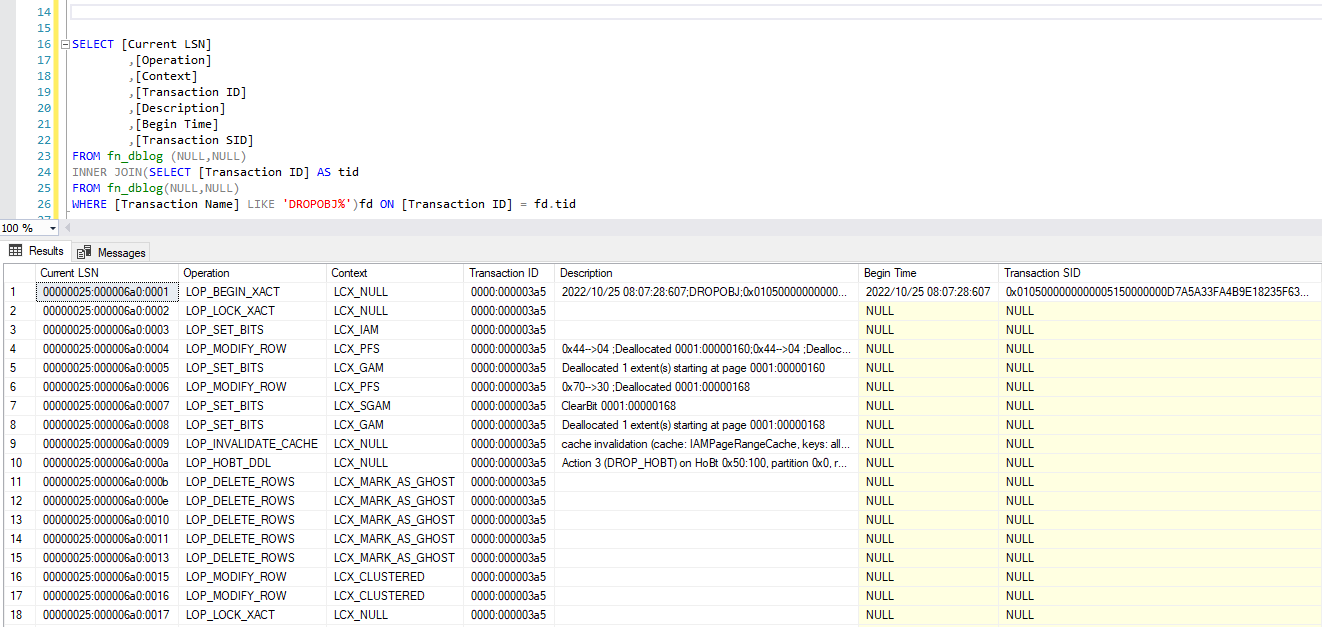
Say you have a user come to you and they dropped a table sometime yesterday, but they don’t remember when and now they need it back. You could start the restore process and roll through logs until you see the drop and then restore to the hour before or you could run this super cool query to get the time the table was dropped.

(Before I ran this, I set up a test database, created a table, filled it with stuff, took a full backup and a transaction log backup, dropped the table and then took another transaction log backup)

SELECT [Current LSN]
		,[Operation]
		,[Context]
		,[Transaction ID]
		,[Description]
		,[Begin Time]
		,[Transaction SID]
FROM fn_dblog (NULL,NULL)
INNER JOIN(SELECT [Transaction ID] AS tid
FROM fn_dblog(NULL,NULL)
WHERE [Transaction Name] LIKE 'DROPOBJ%')fd ON [Transaction ID] = fd.tid

See that Begin Time? We want to roll our logs forward to right before that started. How cool is that?!!! Nearest point in time recovery that is possible all because of reading through the log to see when the drop occurred.

But this next part was the piece that blew my mind. What if I didn’t know who dropped the table, but wanted to talk to them so they didn’t do it again? I can add one more column to my query.

SELECT [Current LSN]
		,[Operation]
		,[Context]
		,[Transaction ID]
		,[Description]
		,[Begin Time]
		,[Transaction SID]
		,SUSER_SNAME ([Transaction SID]) AS WhoDidIt
FROM fn_dblog (NULL,NULL)
INNER JOIN(SELECT [Transaction ID] AS tid
FROM fn_dblog(NULL,NULL)
WHERE [Transaction Name] LIKE 'DROPOBJ%')fd ON [Transaction ID] = fd.tid

I am passing that Transaction SID into the SUSER_SNAME built in function.

Probably shouldn’t be surprised by that answer.

The song for this post is Left and Right by Charlie Puth.

I’m Gonna Spend My Time Speeding that Query Up, Like It’s Never Enough, Like it’s Born to Run…

Have I mentioned that I like query tuning? One of my favorite tuning tricks is removing Sub-queries from WHERE clauses. Let me give an example:

SELECT HeroName
	,HasCape
	,FavoriteColor
	,LairId
FROM [dbo].[SuperHero] s 			
WHERE HeroType = 2
AND NOT EXISTS(SELECT 1 
		FROM [dbo].[SuperHero] x 								
		WHERE x.HeroID = s.HeroID 
			 AND x.IsHuman = 1 AND x.Weakness = 'Lack of Control')

Notice the “NOT EXISTS *Sub-Query* section. Any time I see this pattern or even a “NOT IN *Sub-Query*” pattern, I know I can fix it like this:

SELECT s.HeroName
		, s.HasCape
		, s.FavoriteColor
		, s.LairId
FROM [dbo].[SuperHero] s 
	LEFT JOIN [dbo].[SuperHero] x ON x.HeroID = s.HeroID 
		 AND x.IsHuman = 1
		 AND x.Weakness = 'Lack of Control'	
WHERE HeroType = 2
	AND x.HeroId IS NULL

In this second example, I have moved the sub-query to be in a LEFT JOIN with the same criteria and then in the WHERE I use one of the columns that should be populated (I favor ID columns here) and look to see if it “IS NULL”. That “IS NULL” works the same way as the “NOT EXISTS” and the “NOT IN”.

This allows me to remove the non-sargable arguments from the where clause and takes my query from non-sargable to sargable. (from Wikipedia- The term is derived from a contraction of Search ARGument ABLE. A query failing to be sargable is known as a non-sargable query and typically has a negative effect on query time, so one of the steps in query optimization is to convert them to be sargable).

With simple queries that have a low number of records, I hardly notice a difference in performance. As the queries become more complex or the row numbers increase, the difference begins to show in the query run time and the IO statistics.

The song for this post is I’m Born to Run by American Authors.