Would You Let Me See Beneath Your Beautiful SSRS? Query XML from SSRS Content Field in Catalog Table.

Greetings!

I recently needed to find all the reports that access a certain database.  Easy enough, just get all those with that data source, right? Well not exactly.  I have cross database calls happening on some of my reports, some meaning over 200 of them. I found this really cool way to do it and want to save it for the next time that I have to do it.  I hope you enjoy too!

--ItemBin gets the content as a varbinary(max)

WITH ItemBin AS
(
SELECT
ItemID,Name,[Type]
,CASE Type
WHEN 2 THEN 'Report'
WHEN 5 THEN 'Data Source'
WHEN 7 THEN 'Report Part'
WHEN 8 THEN 'Shared Dataset'
ELSE 'Other'
END AS TypeDescription

,CONVERT(varbinary(max),Content) AS Content
FROM ReportServer.dbo.Catalog
WHERE Type IN (2,5,7,8)
),
--ItemNoBOM removes the BOM if it exists...this is some extra junk that you don't need right now.
ItemNoBOM AS
(
SELECT
ItemID,Name,[Type],TypeDescription
,CASE
WHEN LEFT(Content,3) = 0xEFBBBF
THEN CONVERT(varbinary(max),SUBSTRING(Content,4,LEN(Content)))
ELSE
Content
END AS Content

FROM ItemBin )
--ItemXML gets the content in xml form
,ItemXML AS
(
SELECT
ItemID,Name,[Type],TypeDescription
,CONVERT(xml,Content) AS ContentXML
FROM ItemNoBOM
)
--We can then use the XML data type to extract the queries, along with their command and text and place them in a temp table
SELECT
ItemID,Name,[Type],TypeDescription,ContentXML

,Query.value('(./*:CommandText/text())[1]','nvarchar(max)') AS CommandText
INTO SSRSXMLTemp
FROM ItemXML
--Get all the Query elements (The "*:" ignores any xml namespaces)
CROSS APPLY ItemXML.ContentXML.nodes('//*:Query') Queries(Query)

-- Next we join them to the original Catalog table so I can get the Name and Path while also having the command and then filter out what I don't want
--From the command.

SELECT A.NAME, Path, CommandText
FROM SSRSXMLTemp A
INNER JOIN Catalog C ON A.ItemId =C.ItemId
WHERE CommandText LIKE '%Something I am looking for%'
ORDER BY Name
They said “If you don’t let it out, You’re going to let it eat you away” – CHARINDEX with SUBSTRING

Greetings and other Awesome Salutations,
It has been a while because I am learning oodles of new stuff. There are a few things that I don’t want to forget so here goes.

CHARINDEX is a super easy way to get the starting location of something within a string. For example, I was looking for the last half of Superhero names. My column is SuperheroName in the Comics Table and pretend there are dashes in their names, please just for this example – I know there aren’t really dashes please continue to love me with my flaws.
So…
SELECT TOP 4 SuperheroName
FROM Comics

Results:
Bat-man
Bat-girl
Super-man
Super-girl

Now the magic, CHARINDEX will give you the location of the character you specify.

SELECT TOP 4 CHARINDEX('-', SuperheroName)
FROM Comics

Results:
4
4
6
6

How cool is that?!! But I want to pull back everything after the “-” character, which means I have to get tricky because CHARINDEX will only give me the location number of where it is within the string. SUBSTRING will save the day (Tada!). SUBSTRING is really cool. I am going to pass it ColumnName, Starting Position (using CHARINDEX), Ending Position (using LEN and the column name that will get me the length of that column on that row). So it looks like this:

SELECT TOP 4 SUBSTRING(SuperheroName,CHARINDEX('-',SuperheroName), LEN(SuperheroName))
FROM Comics

Results:
-man
-girl
-man
-girl

But that still isn’t quite what I want…so I am going to add 1 to the Starting point position number (this will allow me to skip over the character I am using):

SELECT TOP 4 SUBSTRING(SuperheroName,CHARINDEX('-',SuperheroName)+1, LEN(SuperheroName))
FROM Comics

Results:
man
girl
man
girl

Oh but wait, there is more! I think it is really silly to have the dashes in the first place so check this out:
SELECT TOP 4
SUBSTRING(SuperheroName,1,CHARINDEX('-',SuperheroName)-1) + SUBSTRING(SuperheroName,CHARINDEX('-',SuperheroName)+1, LEN(SuperheroName))
FROM Comics

Results:
Batman
Batgirl
Superman
Supergirl

Holy Rusted Metal Batman! What did we do? This time in my substring I used the first position and then the CHARINDEX -1 to tell me what was right before the dash. Then I combined them! With these super powers combined…well awesome things happen.

Enjoy!

You’ve been Thunderstruck and can now Find any Table in an Instance

Have you ever remembered what Intstance a table was on but not the database name? This will solve your problem. First you will create the table, then the procedure that will look for it and finally, you will execute the procedure with your table name. (At the end you can drop it so no one knows your secret.)
It returns the database, the schema, the table name and a type.

SET NOCOUNT ON
CREATE TABLE SearchTable(TABLE_CATALOG sysname, TABLE_SCHEMA sysname, TABLE_NAME sysname, TABLE_TYPE varchar(50)) --If you haven't ever used this.
GO 
 
CREATE PROC usp_FindMyTable (@TABLE_NAME sysname = null)
AS
SET NOCOUNT ON 

TRUNCATE TABLE SearchTable -- If you are using it again.
IF @TABLE_NAME IS NULL
BEGIN
PRINT 'No Table to look for. Please supply a table name. Like: ' + CHAR(13)
+ ' EXEC usp_FindMyTable Orders'
GOTO usp_FindMyTable_Exit
END 
DECLARE @MAX_dbname sysname, @dbname sysname, @sql varchar(8000) 
SELECT @MAX_dbname = MAX([name]), @dbname = MIN([name]) FROM master..sysdatabases 
WHILE @dbname @dbname
END 

SELECT * FROM SearchTable 
usp_FindMyTable_Exit:
SET NOCOUNT OFF
RETURNGO
 
EXEC usp_FindMyTable 'Unicorn' -- put in the table you are searching for here. GO
 
SET NOCOUNT OFF
DROP PROC usp_FindMyTable --Clean up so no one knows
DROP TABLE SearchTable --Really, it is our secret. More clean up.
GO

Don’t you cry no more…you can find the TCP Port

Greetings to the Kingdom!

Huge thanks to my friends Dan and Tamie for this one.  It will help you determine the TCP Port for an instance.  I love my friends in the SQL Community and am so happy they are willing to share!

DECLARE @key VARCHAR(50), @RegistryPath VARCHAR(200)
IF (SERVERPROPERTY('INSTANCENAME')) IS NULL
BEGIN
SET @RegistryPath='Software\Microsoft\MSSQLServer\MSSQLServer\SuperSocketNetLib\Tcp\'
END
ELSE
BEGIN
SET @RegistryPath='Software\Microsoft\Microsoft SQL Server\'+CONVERT(VARCHAR(25),SERVERPROPERTY('INSTANCENAME'))+'\MSSQLServer\SuperSocketNetLib\Tcp\'
END
EXEC master.dbo.xp_regread 'HKEY_LOCAL_MACHINE', @RegistryPath, 'tcpPort'

Have a magical day!

Like some kind of day dream I’ll never forget…I made the “Who would be your top speaker choices?” for PASS Summit 2013!!!!

This is just a quick post to say thank you for whomever put me on this list.  I can’t believe it, and am totally bouncing off the walls right now.  The survey results are here:

http://www.sqlpass.org/LinkClick.aspx?fileticket=u_budRInYfA%3d&tabid=1476

I will submit my abstracts now.  I was debating on if anyone would want to listen to me, thank you for making me feel important!  Keep your fingers crossed that I get accepted to speak. I have a different dress for each day of the PASS Summit, I just have to figure out how to pack them.  I hope to see you all there!

Have a magical day, I totally am!

THANK YOU!!!!

Conditional Formatting in Reporting Services

I’m certainly no Reporting Services master, and far from a Business Intelligence Developer, but I do like to tinker around with reports for the bosses from time to time

I like Excel for it’s conditional formatting feature, especially in building heat-map type charts.

So I was looking for a way to replicate the functionality in SSRS and figured I’d pass it on:

Just as an example, boss comes and asks “Hey, what’s the busiest time of day for our order-entry website?”

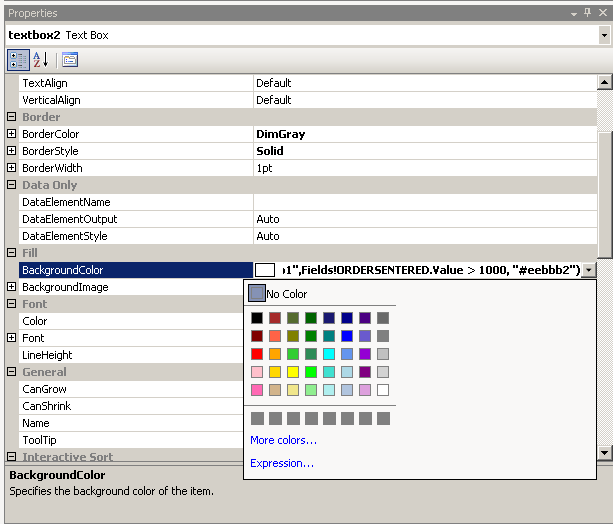
This is easily accomplished by changing the Properties of the cell ( in my case textbox2 ) Fill > BackgroundColor > and click on Expression…

Properties

Expression

From here it is pretty intuitive… I select a color from the values field and using the SWITCH function can apply green for < 100,  yellow for 100 – 500, red for 500-1000, etc.

I end up using the more colors link down right to select a visually appealing color range.

HeatMapReport

This technique can also be used to create alternating background colors that makes a report more readable as used here…

AlternatingRows

It’s not magic, but logic. However, as Andrea says “Have a magical day!”

Let Me Riddle You a Ditty It’s Just an Itty Bitty Little Thing on My Mind About a Group of Unused Indexes Being Disabled All at the Same Time…

Now the funny thing about it, not a story without it, but the story is mine and it ended just fine…Happily Ever After

Today I have a Vendor Application that has WAY too many indexes and they need to rebuild them all tonight in a very tight window.  I am disabling all the unused indexes to allow for a faster rebuild and then will rebuild the disabled indexes tomorrow night after all the heavy work is done.  The Vendor is nervous about us disabling indexes that haven’t been used in over a month.  The good news is that you can simply disable them and then rebuild them if they are needed.  I know the rebuild will take some time, but we have all agreed that if they haven’t been used in over a month, they most likely won’t be used in the next 24 hours.  Now the good part. Running this t-sql code not only tells you what indexes have not been used since the last reboot, but it also gives you a rebuild indexes script that can easily be changed to a disable script. The scripts can all be run at once and will save you oodles of time.

SELECT OBJECT_SCHEMA_NAME(I.OBJECT_ID) AS SchemaName,
OBJECT_NAME(I.OBJECT_ID) AS ObjectName,
I.NAME AS IndexName,
'ALTER INDEX [' + I.Name + '] ON ' + OBJECT_NAME(I.OBJECT_ID) + ' ReBuild' --' Disable'
AS SQLToRebuildOrDisable
FROM sys.indexes I
WHERE /* only get indexes for user created tables*/
OBJECTPROPERTY(I.OBJECT_ID, 'IsUserTable') = 1
/* making sure it is not a primary key*/
and i.is_primary_key = 0
and i.is_unique = 0
/* If the are returned in this table, they are in use so we are getting everything not in this table.*/
AND NOT EXISTS (
SELECT index_id
FROM sys.dm_db_index_usage_stats
WHERE OBJECT_ID = I.OBJECT_ID
AND I.index_id = index_id
-- This will limit to the db you are on.
AND database_id = DB_ID())
-- The Index must have a name for this to work.
AND I.name IS NOT NULL
ORDER BY SchemaName, ObjectName, IndexName

I hope it helps you as much as it has helped me today!
Have a magical day!

Say what you mean, tell me I’m right and reset the identity….

Today I wanted to change the number in my identity column to be way higher. My plan is to union my new table with another table that has a low id and be able to tell what is coming from where.  I know that my old table will never got over 100,000 records, but to be safe I set the number in the new table to start at 700,000.  This is called seeding the identity.  You can also reset your identity this way.  Use caution when you are doing this because if you reseed the identity and it is lower than an existing identity in the table, it will complain when you hit that identity if you are inserting.   Here is my example:

DBCC CHECKIDENT ([Schema.TableName], RESEED, 700000)

Happy Planting!

You must not know about me, I can kill connections in a minute

It is still snowy and cold outside so short post today about killing connections.  I love this quick little script and can’t remember where I got it from, so huge Thank You to the person that created it.  I use it when I need to restore a database that still has active connections.  This will first print a list of the connections it wants to kill for the database in the where clause, if you uncomment the “EXEC” part, you will get the fastest connection killer you have ever used. 

DECLARE @SQL VARCHAR(8000)

SELECT @SQL=COALESCE(@SQL,'')+'Kill '+CAST(spid AS VARCHAR(10))+ '; '
FROM sys.sysprocesses
WHERE DBID=DB_ID('DatabaseName')

PRINT @SQL
--EXEC(@SQL) /*Replace the print statement with exec to execute*/

Enjoy and Have a Magical Day!

Take a good hard look, I’m not okay – I created a cursor!

Last week I did something I promised myself I would never do again. It was horrible, dirty and made me feel like the worst DBA in the world. I didn’t drop a production database or truncate the most important table, this was way worse. I created a cursor. I am hoping that can I appeal to your kindness and understanding. Please help me forgive myself so the healing may begin.

It all started when I needed to build an Error Log report in SSRS. We are using a PowerShell script to go out to all our servers and bring a copy of the latest SQL error log to a centralized database and table. I was making a call to this table and only pulling back the last 4 days worth of data. I have learned over the years that with SSRS if you try to feed it too much data, you don’t get a report, you get a big red “X”. I was getting that “X”. Since I wasn’t allowed to modify the base table incase we needed to review it for other troubleshooting matters, I created a new table that just had the last 4 days worth of data. I was still getting the red “x”. I knew I had to filter my data more. We have a table of specific errors that we want to show up on this report. But they are not the complete error, just parts of it so the error remains generic enough to pull it from any server. In order for me to compare these fields, I need to use a “LIKE” clause. I tried joining with the “LIKE” clause, but I didn’t have any luck. I even tried a “Cross Join”  and a “Hard Join” but it still didn’t work.

In my despair, I was talking to a friend of the kingdom and he suggested a cursor. I backed away in shock. “No, no! Cursors are bad!” I cried. He calmly looked at me and said, “You are trying to use a sledge-hammer to hang a picture right now, try the cursor.”

I sat back down, arguing with myself. Could I do this? Betray what I have always believed and actually use a cursor? I figured I would at least write one and hope that I came up with a better solution in the process.

I know you are all excited to see the monster that I have created, truly a Royal Pain:

SET ANSI_PADDING ON
GO

Declare @objid int
Declare @ErrorMsg Varchar (255)

DECLARE SQLErrorLog_Cursor CURSOR FOR

/*Here is where I load my table of filters. This will allow me to add more errors to the report later without rebuilding anything.*/

SELECT [objid],[ErrorMsg]
FROM [LightsOn].[dbapp].[SQLErrorLogParseList]
OPEN SQLErrorLog_Cursor

FETCH NEXT FROM SQLErrorLog_Cursor
INTO @objid, @ErrorMsg
WHILE @@FETCH_STATUS = 0
BEGIN

/*This is my main query that I need to apply the filter to. InstanceSQLLog is the really large table I am filtering down.*/
INSERT INTO dbapp.SQLErrorLogFilter
SELECT InstanceName, LogDate, Text, P.FullName AS PrimaryOps, P.ID AS PrimaryOpsID,P3.FullName AS SecondaryOps, P3.ID AS SecondaryOpsID
FROM dbapp.InstanceSQLLog ISL
LEFT JOIN dbapp.Instance I ON ISL.InstanceId = I.InstanceID
LEFT JOIN People P ON I.PrimaryOpsDBAId = P.Id
LEFT JOIN dbo.People P3 ON I.SecondaryOpsDBAId = P3.ID
WHERE LogDate > GETDATE()-4 AND TEXT LIKE '%' + @ErrorMsg + '%'

FETCH NEXT FROM SQLErrorLog_Cursor
INTO @objid, @ErrorMsg
END

CLOSE SQLErrorLog_Cursor
DEALLOCATE SQLErrorLog_Cursor
GO

This is one of the steps of a 4 part job that I auto run early in the morning so the reports are in the specified DBA’s Email when they arrive at work (each report is customized to the DBA and the servers that are their Primary responsiblity.).

The whole process goes like this: I truncate the dbapp.SQLErrorLogFilter Table, run this cursor, Truncate the final grouped and filtered table for the report and repopulate that so SSRS gets a very clean and easy to read table. The whole process takes about 8 minutes. I am still trying to find a better way, but this works for now and the team is happy.

I have been toying with the idea of adding FastForward to the cursor. Does anyone have any opinions of why I should or should not do that?

Thank you for being so kind to read. I love how included the community makes me feel and how much everyone is willing to teach each other.

Have a magical week!

Andrea