Hello Darkness my old friend, I can talk to you again because my Availability Group is quiet…

We have a lovely Availability Group that holds A LOT of data that is broken into partitions.  We have 42 partitions and they are usually moving information around daily between them.   The index rebuilds on them were making our logs HUGE because the the Availability Group was taking too long to catch up, we tried both Synchronous and Asynchronous mode.  We would see all kinds of errors.  We were doing horrible things like auto shrinking our transaction log after the indexing finished and  ignoring alarms during the time the database was rebuilding.  We had requested more and more space from our storage team and sometimes the job wouldn’t even finish because it ran out of space.  Our first idea was to split out the index rebuilds so that we could do one partition at a time.

It looks like this:


ALTER INDEX IndexName
ON [dbo].Table
REBUILD PARTITION = 42

By splitting this out, we were able to get the job to finish, but with tons of alarms, and log growth.

Then we had a thought, maybe the server is just spinning too fast and we need to give the Availability Group time to catch up.  So we added some simple waits in between each step.


WAITFOR DELAY '00:10';

As an example this is in minutes and will wait for 10 minutes before running the next step.


It has now been a quiet week and we are looking forward to the Sound of Silence.

Takes as Long as it Takes SQL, Break on Me, I have a DAC…

The DAC, what is it? It is the Dedicated Administrator Console. Basically it is a way to connect to your SQL Server when all the other connections are tied up. But it takes a little bit of pre-planning so that you can use it when things go bad with your SQL Server.  Let’s enable it so you can test using it and know that it is there in the future.


EXEC sp_configure 'remote admin connections', 1;
GO
RECONFIGURE
GO

I was always afraid to use the DAC because I thought I had to use the command line and I am terrible with cmd. But did you know, you can connect to it through Management Studio? Now I can feel right at home when I trouble shoot a sick server.  To connect to a server using the DAC put “admin:” in front of the name of the server like this:

DAC

I use my elevated windows login for this point, but you can use what ever sys admin account that you have.

There are a few words of caution. You can only have one connection to your DAC on each server at a time. So don’t try to connect Object explorer to it. I have SQLPrompt and noticed that my server would send an alert on Severity Error 20 because SQL Prompt was trying to connect at the same time and was failing. Just be aware that you might get an error, but if everything is correct you can look down at the connection at the bottom of the query window and see you are connected.  If someone else is using the DAC, you won’t be able to use the connection, so it is a good idea to always close it when you are done.

Kendra Little b|t has a fantastic post for Brent Ozar Unlimited about the DAC and most importantly to me, how to tell who is connected.  This is the code that she wrote to help identify who is connected:


SELECT
CASE
WHEN ses.session_id= @@SPID THEN 'It''s me! '
ELSE '' END
+ coalesce(ses.login_name,'???') as WhosGotTheDAC,
ses.session_id,
ses.login_time,
ses.status,
ses.original_login_name
from sys.endpoints as en
join sys.dm_exec_sessions ses on
en.endpoint_id=ses.endpoint_id
where en.name='Dedicated Admin Connection'

Now when SQL Server Breaks on you, there is a tool that prevents us from shattering like glass.

If Crazy = Genius, I’m rebuilding one partition at a time!

We have had an index job that has been failing for a while.  This is one of those things you really don’t want to clean up because no one is complaining, but you know you should.  I had heard that I could rebuild one partition at a time, but where to start?  Today, I worked my way through it, so here it is so that you can do it too.

First you need to find the biggest indexes, there is a good chance those are the ones that live on partitions. I am removing Primary Keys.


SELECT i.[name] AS IndexName
,SUM(ps.[used_page_count]) * 8 AS IndexSizeKB
FROM sys.dm_db_partition_stats AS ps
INNER JOIN sys.indexes AS i ON ps.[object_id] = i.[object_id]
AND ps.[index_id] = i.[index_id]
WHERE i.name NOT LIKE 'PK%'
GROUP BY i.[name]
ORDER BY IndexSizeKB DESC

The top ones are most likely the ones you want to focus on.  Next, we need to track down the partition function.


SELECT * FROM sys.partition_functions

Next we are going to figure out which partition we want to rebuild.


SELECT sprv.value AS [Value], sprv.boundary_id AS [ID]
FROM sys.partition_functions AS spf
INNER JOIN sys.partition_range_values sprv ON sprv.function_id = spf.function_id
WHERE (spf.name = N'NameOfFunctionFromPartitionFunctions')
ORDER BY [ID] ASC

Pick the number of the partition you want to rebuild.

Next use your index name from earlier.  You will also need the table name and the partition number.


ALTER INDEX [IndexName]
ON [dbo].[TableName]
REBUILD PARTITION = 3

This will rebuild just the partition that you requested.

Strip it down and remove the bad query plan

Today I got to play with some really bad queries. But the queries weren’t necessarily bad, it was more they had bad plans. I thought I had already blogged about it and tried to find my code. Alas, it wasn’t there so let’s strip it down on how you would remove a bad query plan. I am leaving out the trouble shooting part of how to determine if it is a bad plan because so much of it “depends”.
First you have to find the bad query plan.  Get a unique line from your query and paste it in the query below.

USE master;
GO

SELECT usecounts, cacheobjtype, objtype, text, plan_handle
FROM sys.dm_exec_cached_plans
CROSS APPLY sys.dm_exec_sql_text(plan_handle)
WHERE usecounts > 1
AND TEXT LIKE '%Unique part of query%' --put the unique part of the query here.
ORDER BY usecounts DESC;

Now, copy the plan handle and paste it over the plan handle that I have listed here:

SELECT * FROM sys.dm_exec_query_plan (0x060001004DE4D526F0BEA28F05000);

If you click on the query_plan link, you can see what the plan looks like.  After you have reviewed it and determined the plan is bad then you can paste your plan handle over the one below to remove it from the proc cache.

DBCC FREEPROCCACHE (0x060001004DE4D526F0BEA28F05000)

There you have it. Best of luck with your bad plans.

For one good, naughty little girl found a diamond…Object Explorer Details

It’s Christmas time again and time to listen to my FAVORITE Christmas song called Joel The Lump of Coal.
Just before Thanksgiving we had our SQLSaturday\Big Mountain Data event and I spoke! This is my third time speaking at this event and every year I regret speaking and feel like everyone would have been better in another session, every year that is until this one! I loved my session and I will actually be submitting it to PASS Summit this year. Keep your fingers crossed with me. It was on SQL Server Management Studio Tips and Tricks.

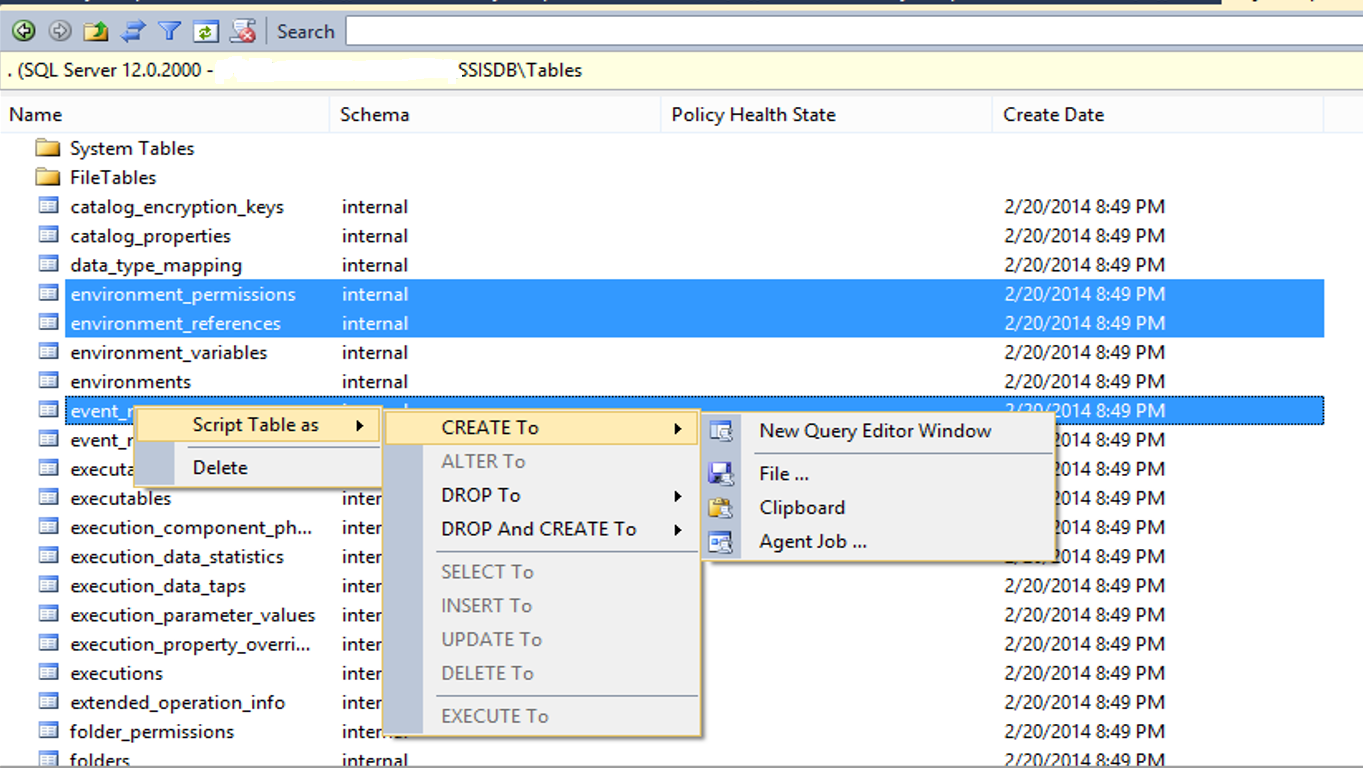
One of the tips that I was super surprised that many people didn’t know is the Object Explorer Details. It allows you to delete multiple objects at once, script out multiple objects at once and just do some really cool stuff. How do I access this magic you are asking? When in management studio, click on View>>Object Explorer Details.


ObjectExplorerDetails

Now you can have a diamond that will help you too!

Needle and the thread Agents running out of it’s head…the disabled agent jobs are still running!

I learned an important lesson this weekend about updating system tables directly. I am getting ready to migrate to a new SQL Server and am setting up agent jobs to match what is on the old server.  I scripted them out and then I ran them on the new server. Then I saw that many of them were enabled.  Rookie mistake! I was in a hurry and googled for an Agent job disable script and found this one:

USE MSDB;
GO
UPDATE MSDB.dbo.sysjobs
SET Enabled = 0
WHERE Enabled = 1;
GO

“Awesome”, I thought to myself and kept going.  But over the weekend our on-call started getting alerts of jobs failing from the new server.  How was this possible? They all showed disabled?

Homer

Well, it turns out that SQL Agent didn’t know they were disabled because I didn’t use the proper Stored Procedure to update the jobs. SQL Agent thought it was supposed to run them, so it kept running them even though they were marked as disabled. We shut down SQL Agent until I could figure out why they were running and that is one of the fixes.  By “rebooting” the agent, it sees all the jobs are disabled and updates.  For Reference, here is the proper way to update jobs to disabled or enabled From HowardH on SQLServerCentral:

--generate disable
SELECT 'exec msdb..sp_update_job @job_name = '''+NAME+''', @enabled = 0' FROM msdb..sysjobs
--generate enable
SELECT 'exec msdb..sp_update_job @job_name = '''+NAME+''', @enabled = 1' FROM msdb..sysjobs WHERE enabled = 0

I added a where clause to the enable script so that if you run them together, you will get all the jobs you should re-enable next time.

Don’t want to look back and say “Could’ve been me!”

Greetings friends! This is a feelings post (you have been warned). Tomorrow I start my new job. Those that see me on a regular basis were shocked to hear I had accepted a new position. It was kind of a shock to me too. I have loved my time with my now previous employer. I was happy, challenged and most importantly appreciated. But then I got a call, an opportunity to work for one of the companies on my list of “Dream Places to Work”. I talked to my boss, he is a coach at heart and told me that I had to at least meet the team and know what I would be turning down or accepting so that I wouldn’t look back and wonder what might have been. I will forever be grateful for the lessons he taught me and the encouragement that he so kindly provided daily.
I did what he said, I met the team, toured the facility, asked questions and finally accepted the offer. It was such a hard choice to leave, if I could work at two places at once, I would have done that. I have been asked a bunch what made me choose to take the offer, so here goes:
1. Opportunity to work with advanced systems, HA and DR that is mature and the chance to learn from it. I won’t lie, I am nervous about learning new stuff, but I also love it, so I am sure it will be good.
2. Opportunity to learn the advanced features of SQL Server that only Enterprise level systems can provide.
3. An awesome team. I have become a bit of a feral DBA, so we will see how this goes. I very much hope that they are understanding of my crazy ideas, weird habits and kind in teaching me how to work with a team again. I also am so excited to learn new things, and be a part of something awesome. I have a lot of information in my brain, but I don’t always trust it, so it is good to have people to bounce ideas off and to gut check my ideas.
4. An awesome boss, his team spoke so highly of him, I knew I would be in good hands. This was also key. I had such an amazing boss already, there is a lot for him to live up to, but seeing the way the team admired and listened to him, plus tease him, helped me see that this could work for me.
5. A chance to learn ASL and make a difference. I have always wanted to learn American Sign Language, now I have a chance. I am super nervous about signing the wrong thing or offending someone (classic Andrea) but I know the only way to learn and get better is to try. Also, I get a sign name, which was kind of the seal on the deal. I am excited to learn what it is tomorrow. Helping people is something that has always been important to me. I make the joke that I am like Mary Poppins in that I only stay as long as I am needed. But making a difference is something that I need. I need to know that I am helping people live better lives, and this is definitely something that helps people.
My princess dresses are also a way to help people. I volunteer work for children’s charities and my personality is a big part of that work. I recently had a discussion with someone about not being just a character. He asked if I should stop wearing the princess dresses because it hides who I am and makes me a character instead of a person. I thought about this question a lot for a few days. I even talked to people about it and asked if they thought that I was more of a joke doing it. But it always came back to me and what I wanted. I feel that me dressing as a princess shows how I feel on the inside but am too shy to show. It is me trying to bring joy to other people. It is a reminder that we all have something special that we can share with the world to make the world better. We can help build up each other and also make the difference in the life of a child. I give a lot of reasons why I do what I do, but at the end of the day, it is because it builds me up so I can keep building other people up. I hope you have felt that love and support and if not, send me a tweet so I can tell you what I see in you.
I spent a lot of time trying to decide what to do. I think a specific song by The Struts made me feel that I had to do it:

I wanna taste love and pain
I wanna feel pride and shame
I don’t wanna take my time
I don’t wanna waste one line
I wanna live better days
Never look back and say
It could have been me

So, tomorrow, it’s me and I am hoping for the best.

And you said you are unconsolable…clean up before you leave

Greetings,

I am approaching my last day at my current job. I love it here and will be really sad to leave, but have an awesome opportunity to grow my knowledge and career with a company on my “want to work for” list.

There are a lot of things to take care of before I leave.  I have been updating documentation (with meme’s) so that it is useful and fun.  I am trying to wrap up all my tickets and outstanding items and last night I woke up and realized, I was the owner of some databases.  This is how I fixed it:

I launched a query window on my Central Management Server to save time, but you can run this on one server at a time if you want.  I used the syntax from sp_helpdb to find out what I wanted to query:

select name, isnull(suser_sname(sid),'~~UNKNOWN~~') AS Owner, convert(nvarchar(11), crdate),dbid, cmptlevel
from master.dbo.sysdatabases
WHERE suser_sname(sid) = 'domain\MyUserName'

Some of the applications in my environment run under a special user and I didn’t want to interfere with those, I just wanted to fix the ones that use me.  Then I borrowed some code from Brent Ozar:

SELECT 'ALTER AUTHORIZATION ON DATABASE:: ['+ name +'] to sa;'
FROM master.dbo.sysdatabases
WHERE suser_sname(sid) = 'domain\MyUserName'

Here’s one I run on the CMS to find any SQL Agent Jobs that I own across my enterprise and then I can run the update scripts that are generated on the individual servers.


SELECT 'EXEC MSDB.dbo.sp_update_job ' + char(13) +
'@job_name = ' + char(39) + [Name] + char(39) + ',' + char(13) +
'@owner_login_name = ' + char(39) + 'sa' + char(39) + char(13) + char(13)+';'
FROM msdb.dbo.sysjobs
WHERE SUSER_SNAME(owner_sid) = 'domain\MyUserName'

She keeps her management studio error to minimal, Southern Style…

It is painful when you have been working on a tough query and you start to get an out of memory error.
“An error occurred while executing batch. Error message is: Exception of type ‘System.OutOfMemoryException’ was thrown”

What in the world? But it was working before! Why is this happening? Is it happening for everyone? Do I need to reboot the SQL Server?

This is a SQL Server Management Studio Error. Usually it means that you have filled up the local memory cache on your machine. Save all your queries and close Management Studio. Once you open it again you “should” be fine, but famous last words right? If that doesn’t work, just reboot. Nice clean memory and you can get back to playing with your super tough query.