Ima make a deal with the SA so the SA don’t bite no more

T-SQL Tuesday

TSQL Tuesday #63 – How do you manage security?

Yay, so this is my first official blog party post.  I was late with my post last month because I didn’t have it figured out until I saw everyone posting and wondered what was going on.

One of my goals for this year is to increase security across my 50 SQL servers.  The SA log-in is a dangerous one and I don’t want it out there on my servers, the trouble is that it is hard to exterminate. Here is my new plan.

I am going to script out my SA log-in and password using this script.

Next I am going to rename the SA log-in to something else and give it a much stronger password. This information will go into my password safe so that I have it just in case I need it.

I am going to create a dummy SA. I have many vendor databases that claim they need SA, but they really don’t and I don’t want them to have high privileges.  I am going to work on lowering the privileges to only give what they need (this will be a slow server by server process to get the permissions right).  The reason I am keeping a log in with the name “SA” is because of vendors who hard code that user name.

As I was talking to people in the #SLCSQL user group last night, someone suggested that we can also monitor that dummy SA login to watch for attacks. It is a great idea and plan to include monitoring on the new log in.

Lars Rasmussen suggested I have a user on each server that will always be there to handle running jobs and other database needs.  I plan to include this too so that when I don’t have a proper SA log in, I will still have a log in that can handle all my fun stuff.

By doing all of this, my SA won’t bite me anymore.

T-SQL Tuesday is a blog party started by Adam Machanic (b|t) just over five years ago.  This month it is hosted by Kenneth Fisher (b|t).

We could be immortals, just not for long when using a duplicate delete!

Sometimes awesome things just happen.  Today Rob Farley (@Rob_Farley) was helping me with a previous post about my dates table and just as a side note he said, “Oh, let me show you something else cool.” It was really cool and so I asked if I could add it to my blog since I never know when this problem will strike.

I have a table about Super Heroes and their cape colors.  I made a mistake and put Batman in there twice.  But since there is no primary key, how do I tell it which one to delete?  Hero Table

Since they are exactly the same, I can let SQL sort it out. This uses both a CTE (I hadn’t ever used it without some kind of join before today) and OVER which I am learning about.  So cool!

WITH SuperHeroDuplicates
AS
(SELECT *, ROW_NUMBER() over (partition by HeroName,CapeColor order by HeroName,CapeColor) as rownum
FROM dbo.HeroCapeColor)
DELETE
FROM SuperHeroDuplicates
where rownum > 1;

Thanks Rob!

—————UPDATE—————

Kenneth Fisher (@sqlstudent144) also wrote a blog post about another way you can accomplish this task if you only have a few of them to delete.

He has been a super big help to me.  He taught me how to display my code better in my blog so it is easier to read and copy. He also encourages me, builds my confidence and even included a link to one of my posts in an article. It made me feel special and like what I have to say matters to other people.  I love how he comments on my posts and gives me ideas on how to make them better. I feel so lucky to be a part of such a great community of people that are so thoughtful, selfless and giving.  Thanks Kenneth for being such a great example to me!

Yeah, that’s my kind of T-SQL!

I have a Dates table and I really love it. This week I needed to do a calculation where I take my monthly budget, divide it by the number of working days in a month and then times it by the working days for the week. That will give me a weekly budget number without having to store it, plus my company only gives me monthly numbers. I had already figured out the daily number and had the calculation working for a 5 day work week when New Years day made everyone notice that it was 5 and I was cheating. So I added a Column to my Dates table to tell me on any given day the number of working days in that week. My weeks run from Sunday to Saturday. I have a Date in my dates table for both the start of the week and the start of the next week. I have a flag (1,0) that says whether or not a day is a weekday and another for whether a day is a holiday. Using this flags, I can pass in a range of dates and get the number of working weekdays.

UPDATE Dates 
SET WorkDaysInWeek = WeekDays 
FROM Dates D 
INNER JOIN  
(SELECT BegW, SUM(IsWeekDay) - SUM(IsHoliday) AS WeekDays 
FROM Dates 
WHERE FullDate Between BegW AND NextWeekStart 
GROUP BY BegW) W ON D.BegW = W.BegW

—————UPDATE—————

But wait, there’s more. Rob Farley who is on twitter @rob_farley sent me an even better way to do it. It gets rid of the need for a WHERE or GROUP BY because we are using OVER. We hoped it would eliminate the sub-query and it does if our query is only a SELECT, but when I go to do an UPDATE, it says that “Windows functions can only appear in the SELECT and ORDER BY clauses”. Rob suggested I use a CTE instead.  I hadn’t ever used a CTE without joining back to it so he taught me how.

This is the super awesome SELECT:

SELECT BegW,SUM(IsWeekday - IsHoliday) OVER (PARTITION BY BegW) AS WeekDays
FROM Dates 

Here is what the UPDATE ended up looking like.

WITH d AS (
SELECT *,SUM(IsWeekday - IsHoliday) OVER (PARTITION BY BegW) AS WeekDays
FROM Dates)
UPDATE d SET WorkDaysInWeek = WeekDays;

The other question that Rob had was what if we have holidays on weekends. This is a great question. At my company, the holiday would be shifted to one of the days of the week, so the counts would still be correct. But if you are in a situation where that is not the case you can change the where clause like this:

WHERE [DayOfWeek] NOT IN (1,7)

As I was writing my where clause, I noticed I did something bad and used a reserved word as a column name. If you happen to make this mistake as well, just make sure to put square brackets [] around the word when you use it.

Huge thank you to Rob for being so kind to help me be better! One of my new goals is to play with OVER and understand how to use it and when. I am also going to be learning more about CTE’s and not having to use joins. Yay! New toys!!!!!

Cause I am the opposite of amnesia you can search for procs and views containing…

Recently I helped with a data center cut over.  Moving databases and making sure all the procedures and views inside them still worked was a high priority.  But how do you find all the Procedures and Views in a database that reference things outside the database?  I needed some kind of keyword search, like bingle for my database.  I found one that used the Information_Schema.Routines and improved on it so that it doesn’t cut off at 4000 characters. Here is the procedure that needs to be created:

CREATE PROC FindProcContaining
    @search VARCHAR(100) = ''
AS
SET @search = '%' + @search + '%'
SELECT name, definition, type_desc
FROM sys.sql_modules m
INNER JOIN sys.objects o ON m.object_id = o.object_id
WHERE definition LIKE @search
ORDER BY definition 

This is what your execute will look like:

EXEC FindProcContaining 'SearchCriteria'

It will return a list of the View or Procedure Name, the Syntax if it is not encrypted and the type of either View or Stored Procedure. I was super excited about it.

In the music the moment you own it and can decode your database!

Yesterday I had the awesome opportunity to present at Big Mountain Data and SQL Saturday Salt Lake City.  I was super nervous, but I think it went well over all.  Huge thank you to the kind friends that sat in the audience to help build my confidence and for everyone that attended.  Here are the scripts that I promised to post.  If you would like the slide deck, it is posted on the Utah Geek Events website here: http://www.utahgeekevents.com/Downloads

The first script is the one that gets the row counts on each table so you can see what tables you want to look at and what tables you want to skip.

 
-- Shows all user tables and row counts for the current database
-- Remove is_ms_shipped = 0 check to include system objects
-- i.index_id < 2 indicates clustered index (1) or hash table (0)
SELECT o.name,
ddps.row_count
FROM sys.indexes AS i
INNER JOIN sys.objects AS o ON i.OBJECT_ID = o.OBJECT_ID
INNER JOIN sys.dm_db_partition_stats AS ddps ON i.OBJECT_ID = ddps.OBJECT_ID
AND i.index_id = ddps.index_id
WHERE i.index_id = 2
AND o.is_ms_shipped = 0
ORDER BY ddps.row_count DESC

This next part is the second demo I did about digging through the database.

 
--What columns are in the Sales Tables?
SELECT A.name, B.name
FROM sys.tables A
INNER JOIN sys.columns B ON A.object_id = B.object_id
WHERE A.name LIKE '%Sales%'

--Column called "Order" something with amount?
SELECT A.name, B.name
FROM sys.tables A
INNER JOIN sys.columns B ON A.object_id = B.object_id
WHERE B.name LIKE '%Order%'

--OrderQty is the column I am looking for...
SELECT A.name, B.name
FROM sys.tables A
INNER JOIN sys.columns B ON A.object_id = B.object_id
WHERE B.name LIKE '%OrderQty%'

--How do I know for sure it is the table I want?
SELECT 
c.name 'Column Name',
t.Name 'Data type',
c.max_length 'Max Length',
c.precision ,
--c.scale ,
--c.is_nullable,
ISNULL(i.is_primary_key, 0) 'Primary Key'
FROM sys.columns c
INNER JOIN sys.types t ON c.user_type_id = t.user_type_id
LEFT OUTER JOIN sys.index_columns ic ON ic.object_id = c.object_id AND ic.column_id = c.column_id
LEFT OUTER JOIN sys.indexes i ON ic.object_id = i.object_id AND ic.index_id = i.index_id
WHERE c.object_id = OBJECT_ID('Sales.SalesOrderDetail')

This is the code from the third demo where I was looking for the foreign keys. I got this off stack overflow and it has been very helpful.

 
SELECT obj.name AS FK_NAME, sch.name AS [schema_name], tab1.name AS [table], col1.name AS [column], tab2.name AS [referenced_table], col2.name AS [referenced_column]
FROM sys.foreign_key_columns fkc
INNER JOIN sys.objects obj ON obj.object_id = fkc.constraint_object_id
INNER JOIN sys.tables tab1 ON tab1.object_id = fkc.parent_object_id
INNER JOIN sys.schemas sch ON tab1.schema_id = sch.schema_id
INNER JOIN sys.columns col1 ON col1.column_id = parent_column_id AND col1.object_id = tab1.object_id
INNER JOIN sys.tables tab2 ON tab2.object_id = fkc.referenced_object_id
INNER JOIN sys.columns col2 ON col2.column_id = referenced_column_id AND col2.object_id = tab2.object_id
WHERE tab1.name = 'SalesOrderDetail'

The other demos that I did were opening Views and stored procedures and a walk through of how to use the Database Diagram feature.

Hope you all had a wonderful time at the event like I did!

It was the coldest night of the year a query with a lot of columns had me in tears…

Yesterday I was working with Jason so super big thank you to him for this script.  We were writing an insert statement and it had a lot of columns.  I was getting ready to script out the table when he showed me this little bit of code.  If you enter your database name and table name it will give you all your columns with commas.  You can even toss your alias in the query so you don’t have to spend a bunch of time adding it.

Declare @DBName as varchar(100)
Declare @tablename as varchar (100)

Set @DBName = 'MyDatabaseName'
Set @tablename = 'MyTableName'

Select T.TABLE_SCHEMA, T.TABLE_NAME
, Stuff(
(
Select ', ' + C.COLUMN_NAME
From INFORMATION_SCHEMA.COLUMNS As C
Where C.TABLE_SCHEMA = T.TABLE_SCHEMA
And C.TABLE_NAME = T.TABLE_NAME
Order By C.ORDINAL_POSITION
For Xml Path('')
), 1, 2, '') As Columns
From INFORMATION_SCHEMA.TABLES As T
Where T.TABLE_CATALOG=@DBName
and T.TABLE_NAME=@tablename

I hope you enjoy it too!

Welcome to the new Deja Vu, you can populate a column from another database….

Greetings and other Salutations!
Yesterday I was working with someone new to T-SQL who needed to get data from one table in a database to another table in a different database. He was stumped and spent hours trying to find some way to do it. I was able to help him and realized this might be a common problem for people new to T-SQL.

We have two databases on our Instance SuperHero and Marvel and each database has a table Superhero.dbo.Character and Marvel.dbo.Bio.

First, prep the table you want to put data in. You won’t be using an insert statement for this task because in our scenario we already have data in our table. To prep my table I am adding a column at the end of my table and allowing it to have nulls.

Character
CharacterID, Name, Universe, RealName(This is our new column that is null)
1, Spider-man, Marvel,
2, Batman, DC,
3, Iron Man, Marvel,

Bio
BioID, Name, CharacterID, RealName(This is where we will update our new column from)
1, Spider-man, 1, Peter Parker
2, Iron Man, 3, Tony Stark

Next, we join across databases. As you can see these two tables would join on CharacterID so:

 
SELECT C.CharacterID, C.Name, C.Universe, C.RealName, B.BioID, B.Name, B.CharacterID, B.RealName
FROM Superhero.dbo.Character C
INNER JOIN Marvel.dbo.Bio B ON C.CharacterID = B.CharacterID

The “INNER JOIN” also acts as my where clause so that it will only update records that match in both. Please always build and test your SELECT statement first to make sure it is going to update what you expect.
Now we build our update:

 
UPDATE dbo.Character
SET RealName = B.RealName
FROM Superhero.dbo.Character C
INNER JOIN Marvel.dbo.Bio B ON C.CharacterID = B.CharacterID

Be sure you are running on the Superhero database for your update.
Who knew bringing super heroes together would only take a query?

I got 99 problems but Autogrowth ain’t one because of CMS

I recently took over a new environment and have had my hands full exploring and setting up all my checks.  When I attended users group a few weeks ago I realized I was doing it the hard way.  I was connecting to each server one at a time to run my install t-sql scripts and checks.  Mike Tutor gave a fantastic presentation on CMS (Central Management Servers) in SQL Server and how to get started using it.  Today I had another issue with a database logfile that had autogrown to an unruly size.  I started to do the math and realized that if I didn’t learn how to use CMS, I would be fixing autogrowth settings all week.  So let’s begin.  This article assumes that you have already registered your Instances into Groups within CMS.  Right-click on your group and select New Query.  Run this query to see where you are at:

 
SELECT sd.name AS DBname, smf.name AS Filename, smf.size, smf.max_size, smf.growth, smf.is_percent_growth
FROM sys.master_files smf
INNER JOIN sys.databases sd ON smf.database_id = sd.database_id

This will give you both the Server Name and the database name on all your files if you are running in CMS but will also work if you are just on one local server.

Next, I am going to use Policy Based Management to Apply a Default Value across all my databases. On a test server, you want to create a new condition:
CreateCondition

Whatever you set that @Growth value to is the value that will be set on all your files that you apply this policy on, please use caution and plan a value that will fit your growth needs.

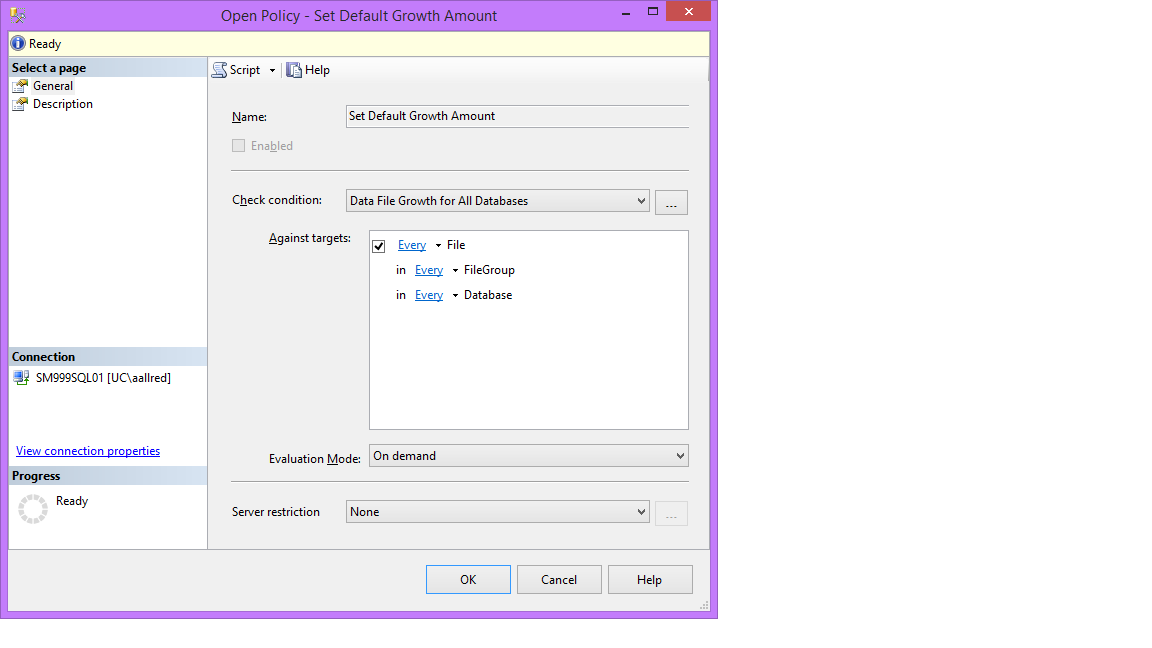
Then pull it into a policy:
CreatePolicy

Right Click on the Policy and Evaluate the policy to make sure it will do what you are expecting it to do. The green ones were already matching what your policy would do. The red ones are the ones the policy would update. Under Details select View to see what the values are now. You can test out how it is going to work by checking a check box or two and selecting Apply.

Export the policy by right clicking on it and selecting “Export Policy”.

Then go back to your CMS Group and right click to Import Policy. Right click on the group again and select Evaluate Policies. Find the one you just imported and check the box for it and run it. This is the same as before, select the check boxes of the ones you want to update and Apply.

Next, I want to be able to control the rate each system database will grow, this is just an example. Please plan your growth and modify as needed. Right click on your CMS group and select New Query and paste this in then modify as needed. (You could also do this with a more specialized policy, but I wanted to use both.)

 
ALTER DATABASE [master] MODIFY FILE ( NAME = N'master', FILEGROWTH = 240MB ) 
GO 
ALTER DATABASE [master] MODIFY FILE (NAME = N'mastlog', FILEGROWTH = 160MB ) 
GO

ALTER DATABASE [msdb] MODIFY FILE ( NAME = N'MSDBData', FILEGROWTH = 240MB )
GO 
ALTER DATABASE [msdb] MODIFY FILE (NAME = N'MSDBLog', FILEGROWTH = 160MB ) 
GO

ALTER DATABASE [model] MODIFY FILE ( NAME = N'modeldev', FILEGROWTH = 240MB ) 
GO
ALTER DATABASE [model] MODIFY FILE (NAME = N'modellog', FILEGROWTH = 160MB ) 
GO

ALTER DATABASE [tempdb] MODIFY FILE ( NAME = N'tempdev', FILEGROWTH = 240MB ) 
GO 
ALTER DATABASE [tempdb] MODIFY FILE (NAME = N'templog', FILEGROWTH = 160MB ) 
GO

Many Chocolate Covered Gummy Bears gave their lives to bring you this information.

Please don’t stop the music…while I add the last day of the month to a table

Greetings!

I have this table that Finance uses to tell what the last day of any given month is in their reports. Through people coming and going, the keeper of this table didn’t keep it and the updates to it stopped.  Eventually, reports that used it stop moving forward as the dates didn’t exist.  I decided to create a job to update this table so it wouldn’t matter if someone forgot to update it.  It automatically will update each month (thank you SQLAgent).  But I was still left with the small problem of determining the last day of the month.  I found that the table had the last day of the month before it, so I am using that table to get the my next month end date.  The current table has two columns, the MonthEndDate and the Date that entry was created. I turned this select into an insert and ta-da we have the last date of the next month.

I add a day to the month end day so I get the first day of the next month.  Then I add a month to that and subtract to the day before the first of that month.

For Example:

MAX(MonthEndDate) = ‘5/30/2014’

Add a day and you get ‘6/1/2014’

Add a month and you get ‘7/1/2014’

Subtract a day and you get ‘6/30/2014’

SELECT DATEADD(day,-1,(DATEADD(m,1,(DATEADD(day, 1,MAX(MonthEndDate)))))),GETDATE()

FROM [dbo].[MonthEndDates]

*Update* Todd commented and showed me that you can just do this in SQL 2012:

SELECT EOMONTH(GETDATE())

That is super awesome!  Thank you for sharing Todd!

Enjoy!

Come in closer and learn how to fix SSRS Subscriptions…

Greetings to the Kingdom,

Over the weekend we had a datacenter move and in the the process moved the database for SSRS.  I knew that my subscriptions would automatically move, so imagine my surprise when they didn’t.  Our SSRS databases were located on a new server that had the same name as the old server.  After running down the error “The EXECUTE permission was denied on the object ‘xp_sqlagent_notify’, database ‘mssqlsystemresource’, schema ‘sys’”, I found a super awesome blog post.  It noted that I was missing assignments to my RSExecRole role.  Once I ran the script, I stopped and restart SSRS and all the subscriptions came over.  Huge sigh of relief.  Have a great day!

http://karthikeyandba.wordpress.com/2011/07/15/the-execute-permission-was-denied-on-the-object-xp_sqlagent_notify-database-mssqlsystemresource-schema-sys/#comment-35


This error will occur when you are trying to create subscriptions for a reports


Execute the below script will solve the issue.


GRANT EXECUTE ON master.dbo.xp_sqlagent_notify TO RSExecRole

GO


GRANT EXECUTE ON master.dbo.xp_sqlagent_enum_jobs TO RSExecRole

GO

GRANT EXECUTE ON master.dbo.xp_sqlagent_is_starting TO RSExecRole

GO


USE msdb

GO


– Permissions for SQL Agent SP’s


GRANT EXECUTE ON msdb.dbo.sp_help_category TO RSExecRole

GO

GRANT EXECUTE ON msdb.dbo.sp_add_category TO RSExecRole

GO

GRANT EXECUTE ON msdb.dbo.sp_add_job TO RSExecRole

GO

GRANT EXECUTE ON msdb.dbo.sp_add_jobserver TO RSExecRole

GO

GRANT EXECUTE ON msdb.dbo.sp_add_jobstep TO RSExecRole

GO

GRANT EXECUTE ON msdb.dbo.sp_add_jobschedule TO RSExecRole

GO

GRANT EXECUTE ON msdb.dbo.sp_help_job TO RSExecRole

GO

GRANT EXECUTE ON msdb.dbo.sp_delete_job TO RSExecRole

GO

GRANT EXECUTE ON msdb.dbo.sp_help_jobschedule TO RSExecRole

GO

GRANT EXECUTE ON msdb.dbo.sp_verify_job_identifiers TO RSExecRole

GO

GRANT SELECT ON msdb.dbo.sysjobs TO RSExecRole

GO

GRANT SELECT ON msdb.dbo.syscategories TO RSExecRole

GO