Cause I am the opposite of amnesia you can search for procs and views containing…

Recently I helped with a data center cut over.  Moving databases and making sure all the procedures and views inside them still worked was a high priority.  But how do you find all the Procedures and Views in a database that reference things outside the database?  I needed some kind of keyword search, like bingle for my database.  I found one that used the Information_Schema.Routines and improved on it so that it doesn’t cut off at 4000 characters. Here is the procedure that needs to be created:

CREATE PROC FindProcContaining
    @search VARCHAR(100) = ''
AS
SET @search = '%' + @search + '%'
SELECT name, definition, type_desc
FROM sys.sql_modules m
INNER JOIN sys.objects o ON m.object_id = o.object_id
WHERE definition LIKE @search
ORDER BY definition 

This is what your execute will look like:

EXEC FindProcContaining 'SearchCriteria'

It will return a list of the View or Procedure Name, the Syntax if it is not encrypted and the type of either View or Stored Procedure. I was super excited about it.

In the music the moment you own it and can decode your database!

Yesterday I had the awesome opportunity to present at Big Mountain Data and SQL Saturday Salt Lake City.  I was super nervous, but I think it went well over all.  Huge thank you to the kind friends that sat in the audience to help build my confidence and for everyone that attended.  Here are the scripts that I promised to post.  If you would like the slide deck, it is posted on the Utah Geek Events website here: http://www.utahgeekevents.com/Downloads

The first script is the one that gets the row counts on each table so you can see what tables you want to look at and what tables you want to skip.

 
-- Shows all user tables and row counts for the current database
-- Remove is_ms_shipped = 0 check to include system objects
-- i.index_id < 2 indicates clustered index (1) or hash table (0)
SELECT o.name,
ddps.row_count
FROM sys.indexes AS i
INNER JOIN sys.objects AS o ON i.OBJECT_ID = o.OBJECT_ID
INNER JOIN sys.dm_db_partition_stats AS ddps ON i.OBJECT_ID = ddps.OBJECT_ID
AND i.index_id = ddps.index_id
WHERE i.index_id = 2
AND o.is_ms_shipped = 0
ORDER BY ddps.row_count DESC

This next part is the second demo I did about digging through the database.

 
--What columns are in the Sales Tables?
SELECT A.name, B.name
FROM sys.tables A
INNER JOIN sys.columns B ON A.object_id = B.object_id
WHERE A.name LIKE '%Sales%'

--Column called "Order" something with amount?
SELECT A.name, B.name
FROM sys.tables A
INNER JOIN sys.columns B ON A.object_id = B.object_id
WHERE B.name LIKE '%Order%'

--OrderQty is the column I am looking for...
SELECT A.name, B.name
FROM sys.tables A
INNER JOIN sys.columns B ON A.object_id = B.object_id
WHERE B.name LIKE '%OrderQty%'

--How do I know for sure it is the table I want?
SELECT 
c.name 'Column Name',
t.Name 'Data type',
c.max_length 'Max Length',
c.precision ,
--c.scale ,
--c.is_nullable,
ISNULL(i.is_primary_key, 0) 'Primary Key'
FROM sys.columns c
INNER JOIN sys.types t ON c.user_type_id = t.user_type_id
LEFT OUTER JOIN sys.index_columns ic ON ic.object_id = c.object_id AND ic.column_id = c.column_id
LEFT OUTER JOIN sys.indexes i ON ic.object_id = i.object_id AND ic.index_id = i.index_id
WHERE c.object_id = OBJECT_ID('Sales.SalesOrderDetail')

This is the code from the third demo where I was looking for the foreign keys. I got this off stack overflow and it has been very helpful.

 
SELECT obj.name AS FK_NAME, sch.name AS [schema_name], tab1.name AS [table], col1.name AS [column], tab2.name AS [referenced_table], col2.name AS [referenced_column]
FROM sys.foreign_key_columns fkc
INNER JOIN sys.objects obj ON obj.object_id = fkc.constraint_object_id
INNER JOIN sys.tables tab1 ON tab1.object_id = fkc.parent_object_id
INNER JOIN sys.schemas sch ON tab1.schema_id = sch.schema_id
INNER JOIN sys.columns col1 ON col1.column_id = parent_column_id AND col1.object_id = tab1.object_id
INNER JOIN sys.tables tab2 ON tab2.object_id = fkc.referenced_object_id
INNER JOIN sys.columns col2 ON col2.column_id = referenced_column_id AND col2.object_id = tab2.object_id
WHERE tab1.name = 'SalesOrderDetail'

The other demos that I did were opening Views and stored procedures and a walk through of how to use the Database Diagram feature.

Hope you all had a wonderful time at the event like I did!

It was the coldest night of the year a query with a lot of columns had me in tears…

Yesterday I was working with Jason so super big thank you to him for this script.  We were writing an insert statement and it had a lot of columns.  I was getting ready to script out the table when he showed me this little bit of code.  If you enter your database name and table name it will give you all your columns with commas.  You can even toss your alias in the query so you don’t have to spend a bunch of time adding it.

Declare @DBName as varchar(100)
Declare @tablename as varchar (100)

Set @DBName = 'MyDatabaseName'
Set @tablename = 'MyTableName'

Select T.TABLE_SCHEMA, T.TABLE_NAME
, Stuff(
(
Select ', ' + C.COLUMN_NAME
From INFORMATION_SCHEMA.COLUMNS As C
Where C.TABLE_SCHEMA = T.TABLE_SCHEMA
And C.TABLE_NAME = T.TABLE_NAME
Order By C.ORDINAL_POSITION
For Xml Path('')
), 1, 2, '') As Columns
From INFORMATION_SCHEMA.TABLES As T
Where T.TABLE_CATALOG=@DBName
and T.TABLE_NAME=@tablename

I hope you enjoy it too!

Welcome to the new Deja Vu, you can populate a column from another database….

Greetings and other Salutations!
Yesterday I was working with someone new to T-SQL who needed to get data from one table in a database to another table in a different database. He was stumped and spent hours trying to find some way to do it. I was able to help him and realized this might be a common problem for people new to T-SQL.

We have two databases on our Instance SuperHero and Marvel and each database has a table Superhero.dbo.Character and Marvel.dbo.Bio.

First, prep the table you want to put data in. You won’t be using an insert statement for this task because in our scenario we already have data in our table. To prep my table I am adding a column at the end of my table and allowing it to have nulls.

Character
CharacterID, Name, Universe, RealName(This is our new column that is null)
1, Spider-man, Marvel,
2, Batman, DC,
3, Iron Man, Marvel,

Bio
BioID, Name, CharacterID, RealName(This is where we will update our new column from)
1, Spider-man, 1, Peter Parker
2, Iron Man, 3, Tony Stark

Next, we join across databases. As you can see these two tables would join on CharacterID so:

 
SELECT C.CharacterID, C.Name, C.Universe, C.RealName, B.BioID, B.Name, B.CharacterID, B.RealName
FROM Superhero.dbo.Character C
INNER JOIN Marvel.dbo.Bio B ON C.CharacterID = B.CharacterID

The “INNER JOIN” also acts as my where clause so that it will only update records that match in both. Please always build and test your SELECT statement first to make sure it is going to update what you expect.
Now we build our update:

 
UPDATE dbo.Character
SET RealName = B.RealName
FROM Superhero.dbo.Character C
INNER JOIN Marvel.dbo.Bio B ON C.CharacterID = B.CharacterID

Be sure you are running on the Superhero database for your update.
Who knew bringing super heroes together would only take a query?

I got 99 problems but Autogrowth ain’t one because of CMS

I recently took over a new environment and have had my hands full exploring and setting up all my checks.  When I attended users group a few weeks ago I realized I was doing it the hard way.  I was connecting to each server one at a time to run my install t-sql scripts and checks.  Mike Tutor gave a fantastic presentation on CMS (Central Management Servers) in SQL Server and how to get started using it.  Today I had another issue with a database logfile that had autogrown to an unruly size.  I started to do the math and realized that if I didn’t learn how to use CMS, I would be fixing autogrowth settings all week.  So let’s begin.  This article assumes that you have already registered your Instances into Groups within CMS.  Right-click on your group and select New Query.  Run this query to see where you are at:

 
SELECT sd.name AS DBname, smf.name AS Filename, smf.size, smf.max_size, smf.growth, smf.is_percent_growth
FROM sys.master_files smf
INNER JOIN sys.databases sd ON smf.database_id = sd.database_id

This will give you both the Server Name and the database name on all your files if you are running in CMS but will also work if you are just on one local server.

Next, I am going to use Policy Based Management to Apply a Default Value across all my databases. On a test server, you want to create a new condition:
CreateCondition

Whatever you set that @Growth value to is the value that will be set on all your files that you apply this policy on, please use caution and plan a value that will fit your growth needs.

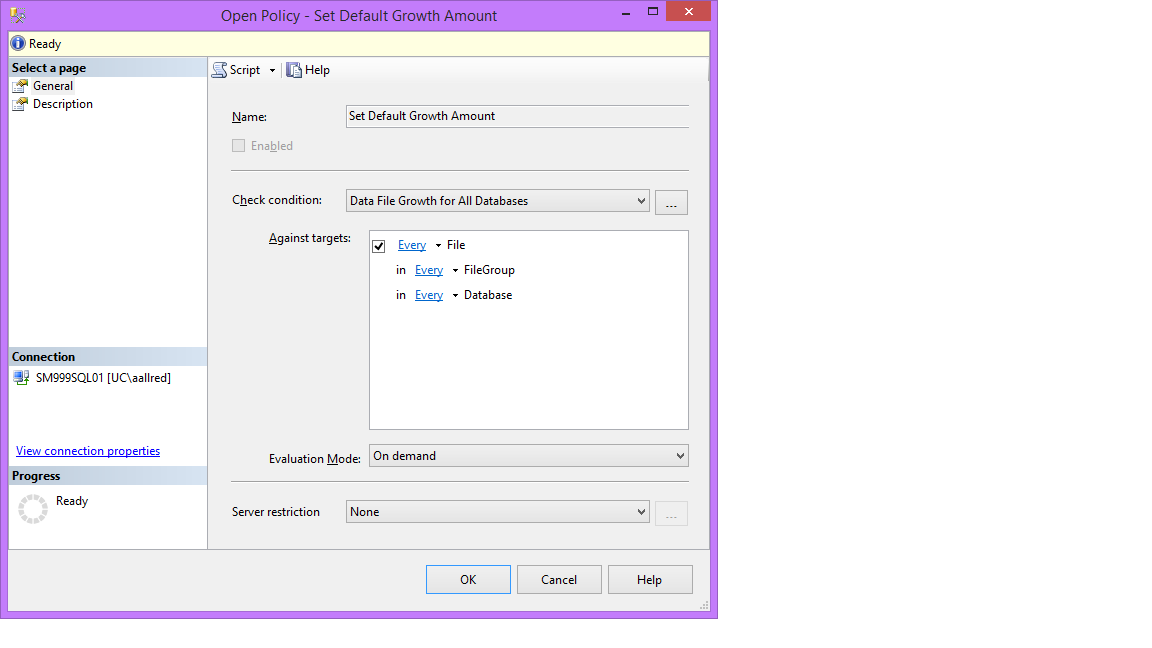
Then pull it into a policy:
CreatePolicy

Right Click on the Policy and Evaluate the policy to make sure it will do what you are expecting it to do. The green ones were already matching what your policy would do. The red ones are the ones the policy would update. Under Details select View to see what the values are now. You can test out how it is going to work by checking a check box or two and selecting Apply.

Export the policy by right clicking on it and selecting “Export Policy”.

Then go back to your CMS Group and right click to Import Policy. Right click on the group again and select Evaluate Policies. Find the one you just imported and check the box for it and run it. This is the same as before, select the check boxes of the ones you want to update and Apply.

Next, I want to be able to control the rate each system database will grow, this is just an example. Please plan your growth and modify as needed. Right click on your CMS group and select New Query and paste this in then modify as needed. (You could also do this with a more specialized policy, but I wanted to use both.)

 
ALTER DATABASE [master] MODIFY FILE ( NAME = N'master', FILEGROWTH = 240MB ) 
GO 
ALTER DATABASE [master] MODIFY FILE (NAME = N'mastlog', FILEGROWTH = 160MB ) 
GO

ALTER DATABASE [msdb] MODIFY FILE ( NAME = N'MSDBData', FILEGROWTH = 240MB )
GO 
ALTER DATABASE [msdb] MODIFY FILE (NAME = N'MSDBLog', FILEGROWTH = 160MB ) 
GO

ALTER DATABASE [model] MODIFY FILE ( NAME = N'modeldev', FILEGROWTH = 240MB ) 
GO
ALTER DATABASE [model] MODIFY FILE (NAME = N'modellog', FILEGROWTH = 160MB ) 
GO

ALTER DATABASE [tempdb] MODIFY FILE ( NAME = N'tempdev', FILEGROWTH = 240MB ) 
GO 
ALTER DATABASE [tempdb] MODIFY FILE (NAME = N'templog', FILEGROWTH = 160MB ) 
GO

Many Chocolate Covered Gummy Bears gave their lives to bring you this information.

They’ll never take my body from your side, Love don’t die from partitioning…

New dress for Christmas

New dress for Christmas

So this week there was this small fire around running out of partitions.  Because I had to learn how all of it works really fast, I need to write it down before I forget.  I was getting a range doesn’t exist error so here is what I did:

I already had my file groups created.  If you don’t do that before you move on.

Find what partition schemes and functions you have in your database:

SELECT * FROM sys.partition_schemes

SELECT * FROM sys.partition_functions

(Hint: the fanout is the last range so that can help you identify which one is failing.)

Next, see what your current ranges look like:

SELECT sprv.value AS [Value], sprv.boundary_id AS [ID]
FROM sys.partition_functions AS spf
INNER JOIN sys.partition_range_values sprv ON sprv.function_id = spf.function_id
WHERE (spf.name = N'PartitionFunctionName')
ORDER BY [ID] ASC

Now we are going to split out our partitions one at a time.  Even if you need to add 5 or more ranges, this is an easy step to do one at a time.  Also, you can only split a range into to pieces at a time, so just run the whole query for each range you want to add.

ALTER PARTITION SCHEME [PartitionScheme] NEXT USED [YourFileGroup]

ALTER PARTITION FUNCTION [PartitionFunction]() SPLIT RANGE (N'NewRange')

This should get you back on track.

Happy Trails!

Or you can start speaking up and query the backupset…

Today I needed to get the file name for the latest full back. I am using it so I can restore a database using an SSIS packages onto another server. Since there are full, diffs and logs, I had to specify type “D” in the code. That sounds a little off, but L = Log, I = Diff and D = Full. I debating on putting the subquery into a CTE, but this is such a quick hit, I did it the dirty way. I hope it helps you!

SELECT physical_device_name,
backup_start_date,
backup_finish_date,
backup_size/1024.0 AS BackupSizeKB
FROM msdb.dbo.backupset bINNER JOIN msdb.dbo.backupmediafamily m ON b.media_set_id = m.media_set_id
WHERE database_name = 'MyDatabase' AND type = 'D' AND backup_start_date = (SELECT MAX(backup_start_date) FROM dbo.backupset WHERE database_name = 'MyDatabase' AND type = 'D')
ORDER BY backup_finish_date DESC

Come in closer and learn how to fix SSRS Subscriptions…

Greetings to the Kingdom,

Over the weekend we had a datacenter move and in the the process moved the database for SSRS.  I knew that my subscriptions would automatically move, so imagine my surprise when they didn’t.  Our SSRS databases were located on a new server that had the same name as the old server.  After running down the error “The EXECUTE permission was denied on the object ‘xp_sqlagent_notify’, database ‘mssqlsystemresource’, schema ‘sys’”, I found a super awesome blog post.  It noted that I was missing assignments to my RSExecRole role.  Once I ran the script, I stopped and restart SSRS and all the subscriptions came over.  Huge sigh of relief.  Have a great day!

http://karthikeyandba.wordpress.com/2011/07/15/the-execute-permission-was-denied-on-the-object-xp_sqlagent_notify-database-mssqlsystemresource-schema-sys/#comment-35


This error will occur when you are trying to create subscriptions for a reports


Execute the below script will solve the issue.


GRANT EXECUTE ON master.dbo.xp_sqlagent_notify TO RSExecRole

GO


GRANT EXECUTE ON master.dbo.xp_sqlagent_enum_jobs TO RSExecRole

GO

GRANT EXECUTE ON master.dbo.xp_sqlagent_is_starting TO RSExecRole

GO


USE msdb

GO


– Permissions for SQL Agent SP’s


GRANT EXECUTE ON msdb.dbo.sp_help_category TO RSExecRole

GO

GRANT EXECUTE ON msdb.dbo.sp_add_category TO RSExecRole

GO

GRANT EXECUTE ON msdb.dbo.sp_add_job TO RSExecRole

GO

GRANT EXECUTE ON msdb.dbo.sp_add_jobserver TO RSExecRole

GO

GRANT EXECUTE ON msdb.dbo.sp_add_jobstep TO RSExecRole

GO

GRANT EXECUTE ON msdb.dbo.sp_add_jobschedule TO RSExecRole

GO

GRANT EXECUTE ON msdb.dbo.sp_help_job TO RSExecRole

GO

GRANT EXECUTE ON msdb.dbo.sp_delete_job TO RSExecRole

GO

GRANT EXECUTE ON msdb.dbo.sp_help_jobschedule TO RSExecRole

GO

GRANT EXECUTE ON msdb.dbo.sp_verify_job_identifiers TO RSExecRole

GO

GRANT SELECT ON msdb.dbo.sysjobs TO RSExecRole

GO

GRANT SELECT ON msdb.dbo.syscategories TO RSExecRole

GO

Would You Let Me See Beneath Your Beautiful SSRS? Query XML from SSRS Content Field in Catalog Table.

Greetings!

I recently needed to find all the reports that access a certain database.  Easy enough, just get all those with that data source, right? Well not exactly.  I have cross database calls happening on some of my reports, some meaning over 200 of them. I found this really cool way to do it and want to save it for the next time that I have to do it.  I hope you enjoy too!

--ItemBin gets the content as a varbinary(max)

WITH ItemBin AS
(
SELECT
ItemID,Name,[Type]
,CASE Type
WHEN 2 THEN 'Report'
WHEN 5 THEN 'Data Source'
WHEN 7 THEN 'Report Part'
WHEN 8 THEN 'Shared Dataset'
ELSE 'Other'
END AS TypeDescription

,CONVERT(varbinary(max),Content) AS Content
FROM ReportServer.dbo.Catalog
WHERE Type IN (2,5,7,8)
),
--ItemNoBOM removes the BOM if it exists...this is some extra junk that you don't need right now.
ItemNoBOM AS
(
SELECT
ItemID,Name,[Type],TypeDescription
,CASE
WHEN LEFT(Content,3) = 0xEFBBBF
THEN CONVERT(varbinary(max),SUBSTRING(Content,4,LEN(Content)))
ELSE
Content
END AS Content

FROM ItemBin )
--ItemXML gets the content in xml form
,ItemXML AS
(
SELECT
ItemID,Name,[Type],TypeDescription
,CONVERT(xml,Content) AS ContentXML
FROM ItemNoBOM
)
--We can then use the XML data type to extract the queries, along with their command and text and place them in a temp table
SELECT
ItemID,Name,[Type],TypeDescription,ContentXML

,Query.value('(./*:CommandText/text())[1]','nvarchar(max)') AS CommandText
INTO SSRSXMLTemp
FROM ItemXML
--Get all the Query elements (The "*:" ignores any xml namespaces)
CROSS APPLY ItemXML.ContentXML.nodes('//*:Query') Queries(Query)

-- Next we join them to the original Catalog table so I can get the Name and Path while also having the command and then filter out what I don't want
--From the command.

SELECT A.NAME, Path, CommandText
FROM SSRSXMLTemp A
INNER JOIN Catalog C ON A.ItemId =C.ItemId
WHERE CommandText LIKE '%Something I am looking for%'
ORDER BY Name