Recently, the wrong table got dropped and we needed to bring it back. I had never done a restore in an Azure Managed Database before so I learned something really fast.
First, I log into the Azure Portal (portal.azure.com)
I select “SQL servers”:

I pick the right server that my managed database is on (it has the type of “SQL server”) and I click on the name of the server (it is a link to where I need to go)

In the next screen under Settings, I select SQL databases:

I click on the name of the database that I need to restore. It will take me to another screen.
It gives me this list of options at the top (this is also where I would go to create a copy of a database for another environment like dev).

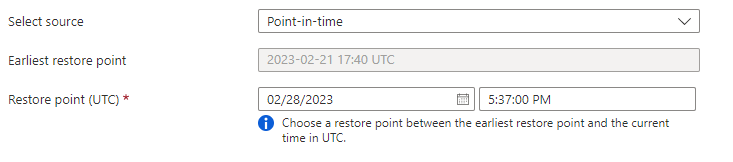
I select “Restore” and it takes me to another screen where it has most of the restore ready to go. Here is where I can pick a point in time recovery or the most recent possible. Since I knew about the time the delete had happened, I am going to restore to just a few minutes before the delete. (It will be in UTC time) Most recent would have not have what I need because it took the user a little bit of time to let me know what had happened.
I can name what the database is going to be, I can add a date or time to this name so I know when it was created.

I set my storage for the cheapest options because this is just a restore that I am going to pull data from back into my current database. I won’t be keeping it long.

I select review + create at the bottom and it will start restoring my database. Depending on the size, it might take time, but it was pretty quick for me.
I pull the data back into the table that I need and then go back to the SQL Databases screen and find my newly created database name. I click on the newly created database name and this time, instead of “Restore”, I select “Delete” and follow the prompts to remove it.

This was the easiest point in time restore I have EVER done. It was fast and I didn’t have to keep adding each log to roll forward.
The song for this post is Lucky by Elle King.

 Andrea Allred presents RoyalSQL
[…] Andrea Allred recovers from a mistake: […]
I got a phone call about a year ago now where someone ran bad code on some Azure DBs and used this method to restore the DBs.
After restoring the DBs I renamed the bad ones out and the good ones in it’s place. A task that normally would have taken a few hours took me about an hour or 2 to complete.
Isn’t it the best? So easy!